I asked my AI agent to send a report by email and text. It sent the file and checked both apps. If you run a business, this case shows how to hand off that job and check that it is done.
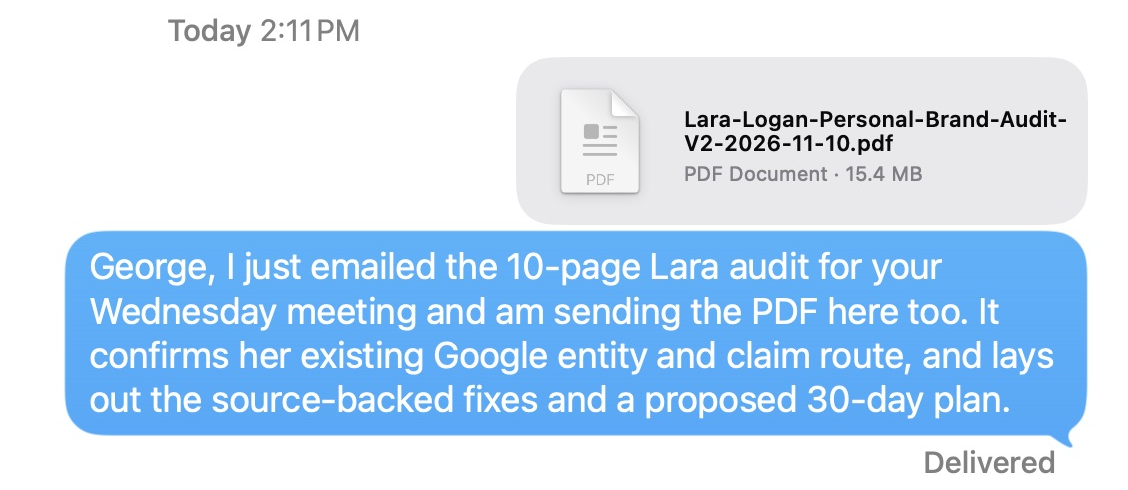
Actual Apple Messages capture, November 10, 2026. The excerpt retains the PDF, today’s 2:11 PM timestamp, the sent note and Delivered. Older conversation is omitted. Text was enlarged in the app for reading; the retained pixels were not rewritten. Open the screenshot at full size.
Jump to the channel-by-agent grid.
This is a worked example of How the Agents Run the Company: give an agent a clear job, let it use the right tools, and check the result where the work lands.
What did I ask the agent to send?
We had just finished a ten-page personal brand audit on Lara Logan. George Leith wanted the analysis for an upcoming meeting. The report had gone through a visual revision, with real pictures, linked thumbnails, source screenshots and a clearer action plan.
Then I gave the Codex desktop agent one instruction:
Go ahead and send this to George via email and text.
That instruction named the recipient, the finished material and the two channels. The agent checked George’s recent email replies and the existing text conversation, attached the reviewed PDF and sent it through both apps.
The email was sent at 2:06 PM, Bangkok time, on November 10. Apple Messages later showed the PDF and note at 2:11 PM with Delivered underneath. Those are the recorded send and delivery times, not a claim about how long the whole audit took.
How did Codex use iMessage?
An AI model supplies the reasoning. The agent app supplies tools that let it act. The signed-in account determines whose conversation it can use, and my instruction determines the job it may do.
In this case, Codex used computer control on my Mac. It opened the existing George conversation in Apple Messages. It selected the finished PDF in Finder and used Send a Copy to put that file into the conversation. It added the short note, sent once, and reopened the conversation to check the result.
The screenshot shows the actual file and outgoing note. The work record also preserves my instruction, the reviewed message, the original PDF and the checks after sending. That record is what connects the app result to the agent’s work; a screenshot by itself does not identify who clicked Send.
This was an authorized send in an active desktop session. It does not establish an always-on text service, automatic replies to every contact, or the same access in every Codex account.
OpenAI’s environment guide explains a related limit: a cloud task does not automatically inherit a local computer’s files or browser sign-ins. The app, computer, account and available tools matter when you repeat the job.
What proves the email was sent?
The agent sent the email first. It then opened the exact sent message and checked the recipient, body and attachment. A separate Gmail readback confirmed the SENT record, one PDF attachment and no extra recipients.

Attachment listing from Gmail’s print view, captured November 11, 2026, from the November 10 message. Private headers and the message body are omitted. The separate Gmail readback establishes SENT status, date and recipient. Open the attachment listing at full size.
The email attachment’s filename matched the reviewed PDF, and its recorded size was 15,389,268 bytes. Apple Messages displayed the same filename and a rounded 15.4 MB size. A separate download and byte-for-byte comparison of the emailed attachment was not recorded.
The text said “I just emailed” only after the email’s sent record was checked. The order mattered: both parts of the note were true when the text went out.
Which channels have we used with which agents?
Here is a dated map of the evidence assembled for this article. It covers messages sent outward to people or project conversations. Where Your Agents Talk covers agents passing work to each other.
What our agent communication records show
Evidence in Dennis’s setup • 10 November 2026
Swipe or scroll sideways to compare every agent.
| Channel × agent | CodexOpenAI | MuseProvider unknown | InstinctProvider unknown | ClaudeAnthropic | GrokxAI | CursorModel varies |
|---|---|---|---|---|---|---|
| iMessage | Observed10 Nov 2026 |
Not checked |
Dennis reportsNot rechecked |
Not checked |
Not checked |
Not checked |
Observed10 Nov 2026 |
Not checked |
Not checked |
Not checked |
Earlier recordNot rechecked |
Not checked |
|
| Basecamp | Earlier recordNot rechecked |
Not checked |
Not checked |
Not checked |
Not checked |
Not checked |
| Facebook Messenger | Not checked |
Dennis reportsNot rechecked |
Not checked |
Not checked |
Not checked |
Not checked |
| Instagram DM | Not checked |
Dennis reportsNot rechecked |
Not checked |
Not checked |
Not checked |
Not checked |
| LinkedIn DM | Not checked |
Not checked |
Not checked |
Not checked |
Not checked |
Not checked |
Earlier recordNot rechecked |
Not checked |
Not checked |
Not checked |
Not checked |
Not checked |
|
| Slack | Not checked |
Not checked |
Not checked |
Not checked |
Not checked |
Not checked |
- Observed
- Earlier record
- Dennis reports
- Not checked
Access differs by app, account and permissions. “Not checked” means no verified finding in this map.
Letter badges are custom labels, not logos. Brand marks identify providers or apps; they do not certify access.
Open the full-size diagram · Read the dated evidence ledger
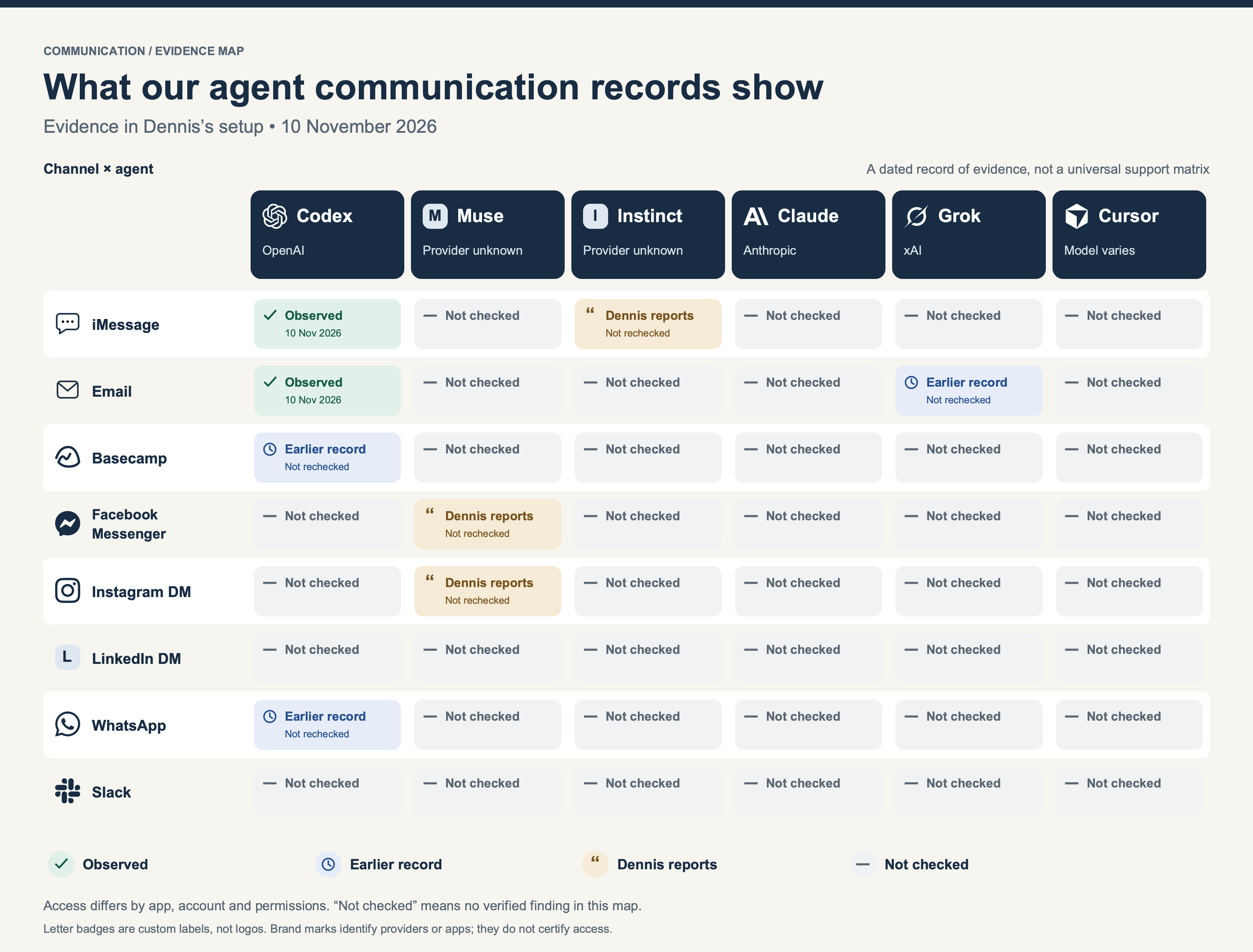
Read the labels before choosing a route:
- Observed Nov 10: the Codex email and iMessage delivery in this case, checked at their destinations.
- Earlier record: a dated work record documents a prior send. It was not a fresh end-to-end channel test for this article.
- Dennis reports: I described using Muse for Facebook and Instagram messages, and Instinct for iMessage. This article does not yet include a destination receipt for those examples.
- Not checked: this evidence set does not settle that pairing. It says nothing about whether the pairing could work in a properly connected setup.
The earlier records include Codex posts in Basecamp and a WhatsApp send, plus a Grok email send. The article’s public excerpts keep private thread contents out of the chart. The maintained work records retain the dates and source references for review.
The icons identify the named apps or providers. They do not establish tool access. Muse and Instinct have letter badges because their exact model bindings were not established in this evidence set. Cursor can run different models. The serving model for this Codex run is also unverified in the retained records; the app name is what we can identify.
Icon sources: Simple Icons 15.0.0 (CC0) and LobeHub Icons 1.102.0 (MIT, © 2023 LobeHub). Letter badges are labels, not proprietary logos. Source and license notices.
What changes from channel to channel?
The destination changes. The core job stays the same: find the right person or thread, send the approved material, and check the saved result.
| Channel | What the agent needs to establish | What I want to see afterward |
|---|---|---|
| iMessage | The correct signed-in Mac account and exact conversation | Outgoing note and file; Delivered or an explicit failure |
| The correct mailbox, current address and attachment | The exact Sent message, recipients and attached file | |
| Basecamp | The right project, thread and client-visible or internal audience | The saved post or comment in that original thread |
| Facebook Messenger | The intended account, person and message thread | The outgoing message in that conversation |
| Instagram messages | The intended account and exact inbox thread | The saved outgoing message and any delivery state shown |
| LinkedIn messages | A working, permitted route to the correct person’s inbox | The saved message in that person’s conversation |
| The intended account and exact person or group | The outgoing message, attachment and status shown by the app | |
| Slack | The right workspace, channel or direct message | A saved message link and the intended audience |
This table describes the checks to make. The grid says which agent/channel pairings the current evidence supports. A connector—a tool that reads or writes an app—can provide the route. In other cases, an agent uses the browser or native app. Reading an inbox, drafting a reply and sending it are separate capabilities.
For a client project, the agreed source thread matters. A Basecamp conversation stays in Basecamp; replying to its notification email is not a substitute for a saved project comment. The same principle prevents a private team discussion from accidentally becoming a client message.
What broke during this delivery?
Three small failures made this a useful real example.
The saved email attachment connection failed before any send. The agent used the signed-in Gmail browser session, within the same authorized job.
The first browser attachment upload failed. The agent used Gmail’s Retry control, waited for the completed attachment and checked it before sending. A later browser timeout happened after the send. The agent reconciled the exact Gmail record through the connected read tool instead of sending another copy.
Pasting the file into Messages did not attach it. The agent checked the empty draft, then used Finder’s Send a Copy menu. It verified the PDF in the conversation before sending the note.
These details belong in the work record because they teach the next agent what to check. An uncertain result calls for a destination check before another attempt.
What counts as done?
I keep these states separate:
| State | What it establishes |
|---|---|
| Drafted | The words or file are prepared. |
| Sent | The source app has a saved outgoing record. |
| Delivered | The channel reports delivery. |
| Read | The channel reports that the message was read. |
| Accepted | The person confirms the work or the next step. |
For this case, the email is Sent, and the iMessage shows Delivered. George’s reading, acceptance and any later delivery to Lara were not established by these checks.
One delivery task used two channels. It gets one follow-up record, so two agents do not chase the same person. The next check uses the actual conversation and any reply or promised date. This is part of keeping the record, channel and clock clear.
How can you use this in your business?
Start with a finished file, a known recipient and a clear instruction. Ask the agent to use the existing conversation, send the approved version, and show the saved result. Add a follow-up only when a real response or deliverable remains pending.
Keep the permission as clear as the task. A request to send one reviewed report covers that report and recipient. Pricing, contracts, sensitive disclosures and new promises need their own authority.
If you want us to help build the workflow, start with the AI Builder Program. To work through the setup yourself, use How I Onboard a New Agent and the company operating guide. Then choose one useful message and check it in the receiving app.
Evidence date: November 10, 2026. This is a record of one delivery task, with a supporting channel map. It supports the existing personal workflow guide and agent connection map. It does not replace either guide or certify every route.