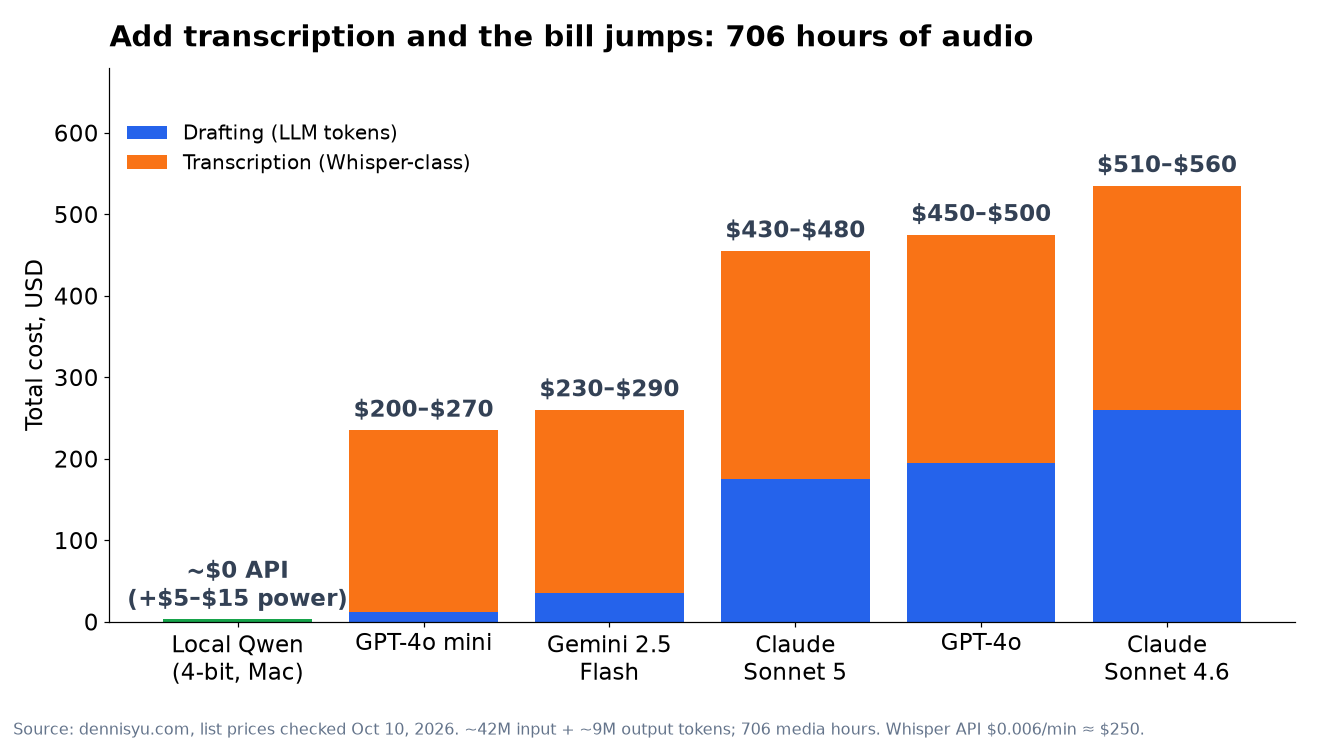
The short version: I queued 1,813 pieces of client media (about 706 hours of audio and video) through my Content Factory. On local Qwen running on my Mac, the AI bill is about $0 in API fees, plus $5 to $15 of electricity. Running the same batch through cloud APIs would cost about $200 to $560, depending on the model. Most of that cloud bill isn't the writing. It's the transcription.
Most young marketers I meet are paying per token for work that a laptop could do overnight. Show notes, first drafts, tags, summaries. They watch a $40 charge here and a $90 charge there and call it the cost of doing business with AI.
It's not. It's the cost of not owning the process.
Here are the real numbers from this weekend, so you can do the math on your own backlog.
Not sure which Qwen to run, or whether you need a new Mac? I added a plain-English guide near the end: Which Qwen should I run?
What I measured
Two client libraries, a podcast and YouTube backlog, went into the queue on my Macs as stage-only drafts. Nothing publishes to their sites until a human says so.
- ~1,813 items: long episodes plus Shorts and clips
- ~706 hours of audio and video
- ~890 hours of local transcription time (Whisper on the Mac’s CPU). My first estimate was ~335 hours; the measured rate is higher.
- ~460 to 520 hours of local Qwen drafting time (Qwen3.8-27B, 4-bit, on MLX). My first estimate was ~290 hours (and ~270 for Matthew’s library alone); measured drafting runs slower.
- Cost: ~$0 in API fees, about $5 to $15 of electricity across both Macs
That's not a demo with five files. It's a real production backlog, and it's the kind of volume that blows up a per-token budget.
The cost table
To price the cloud version, I sized a "factory pack" for each item: the transcript in, plus a draft article, social posts, and tags out.
- Long episode: ~40,000 input tokens, ~8,000 output tokens
- Short or clip: ~5,000 input tokens, ~1,500 output tokens
- Whole batch: ~42 million input tokens and ~9 million output tokens
| Lane | List price (in / out per 1M tokens) | Drafting only | + Whisper-class transcription |
|---|---|---|---|
| Local Qwen 4-bit (my Macs) | $0 (your hardware) | ~$0 API | ~$0 + $5–$15 power |
| GPT-4o mini | $0.15 / $0.60 | ~$12 | ~$200–$270 |
| Gemini 2.5 Flash | $0.30 / $2.50 | ~$35 | ~$230–$290 |
| Claude Sonnet 5 | $2 / $10 | ~$175 | ~$430–$480 |
| GPT-4o | $2.50 / $10 | ~$195 | ~$450–$500 |
| Claude Sonnet 4.6 | $3 / $15 | ~$260 | ~$510–$560 |
List prices checked October 10, 2026. Whisper API: $0.006 per minute. These are ballparks, not invoices. Retries, longer prompts, or a second editing pass push the cloud numbers up, and batch or cached-input discounts can push them down.
Why transcription often costs more than the writing
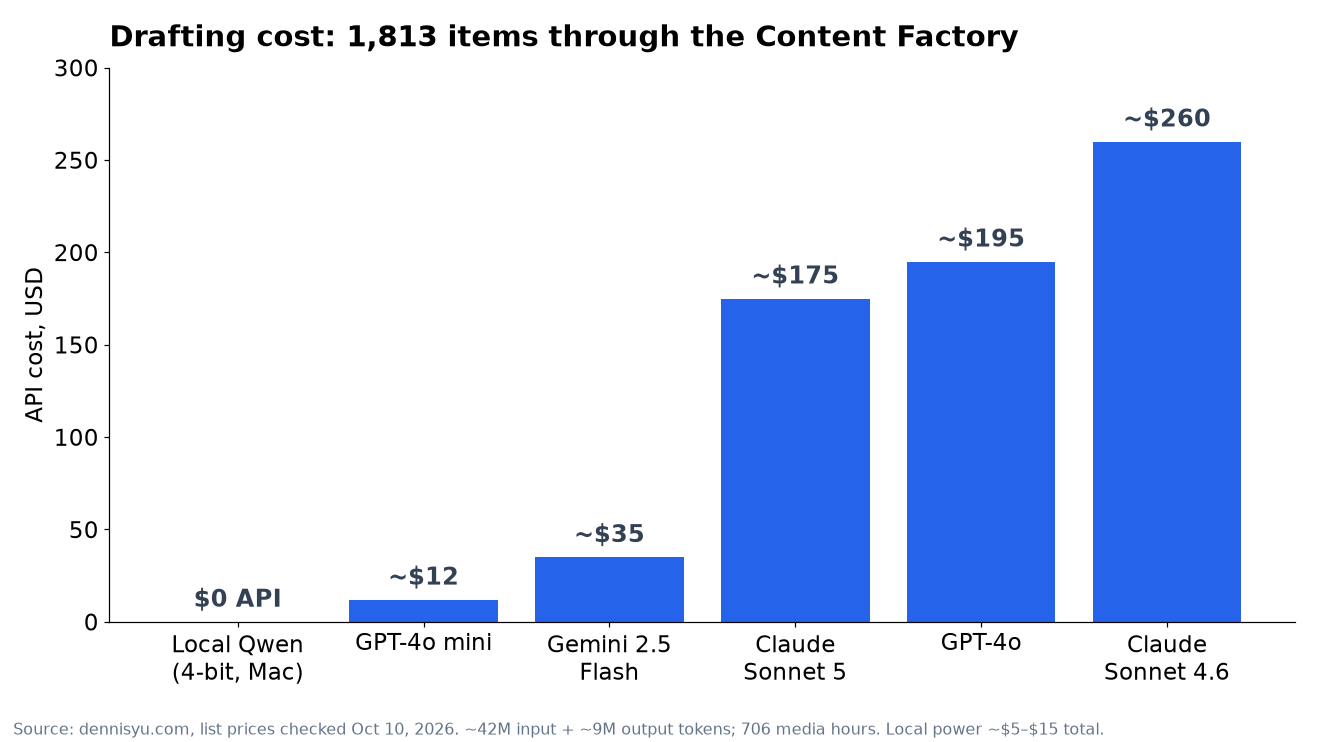
Look at GPT-4o mini. Drafting the whole batch costs about $12. That's nothing.
Then you add transcription and it jumps to about $200 to $270.
Here's why. Whisper costs $0.006 a minute, or about $0.36 an hour. Multiply that by 706 hours of media and you get about $250 before a single word gets drafted. Cheaper cloud speech models move that number a little, but not by much. Audio hours are the expensive part of a media backlog, and per-minute pricing never stops charging.
On the Mac, Whisper runs locally for free. So does Qwen. The bill turns into one line item: power.
Most people pick a cheaper LLM to save money. The bigger savings come from moving transcription off the meter.
Throughput: how much video one Mac can process
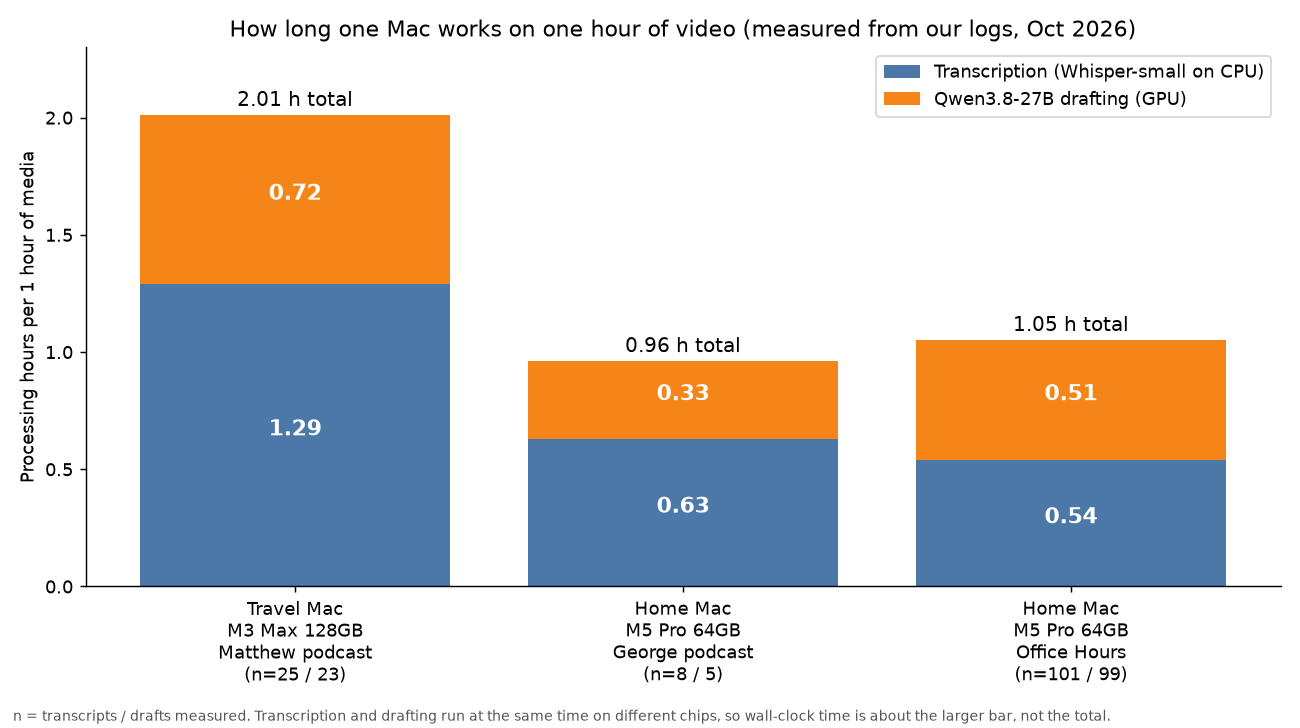
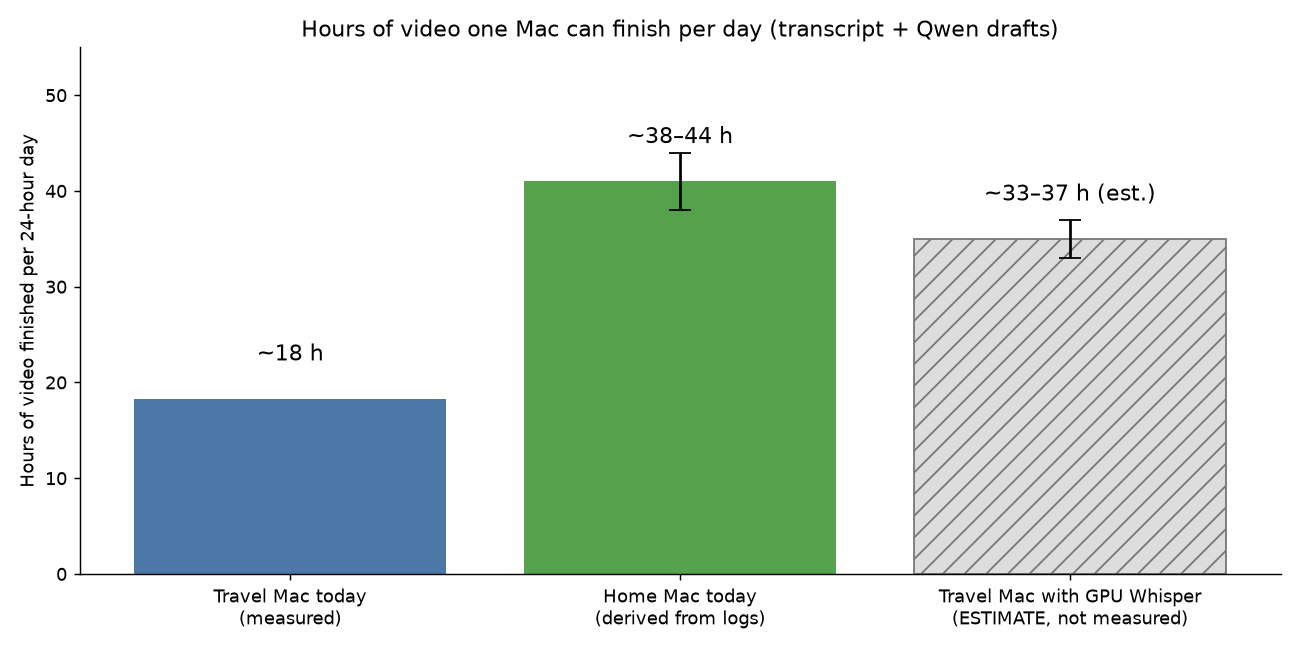
The short version: one hour of video keeps a Mac busy for about one to two hours. My M5 Pro finishes about 40 hours of video a day. My older M3 Max finishes about 18 hours a day, because its transcription step is slower. Power costs about 1 to 2 cents per hour of video. The same work through cloud APIs costs about 28 to 79 cents per hour of video.
Think of it like a two-person kitchen. One cook (Whisper) turns the audio into words. The second cook (Qwen) turns the words into a summary, an article outline, clip ideas, and social posts. They work at the same time, so the slower cook sets the pace. On my Macs, the slow cook is transcription, not Qwen.
The numbers, measured from my own logs
| Per 1 hour of video | Travel Mac (M3 Max, 128 GB) | Home Mac (M5 Pro, 64 GB) |
|---|---|---|
| Transcription (Whisper-small, CPU) | 1.29 h | 0.54 to 0.63 h |
| Qwen3.8-27B drafting (GPU) | 0.72 h (median 0.60) | 0.33 h (drafts) to 0.51 h (drafts + full article) |
| Total machine work | ~2.0 h | ~1.0 h |
| Wall-clock time (steps overlap) | ~1.3 h (measured) | ~0.55 to 0.63 h (derived) |
| Hours of video finished per day | ~18 | ~38 to 44 |
| Electricity per hour of video* | ~1 to 2 cents | ~0.5 to 1 cent |
| Cloud API equivalent (from the table above) | ~$0.28 to $0.79 per hour of video ($0.36 of that is Whisper transcription alone) | |
Sample sizes: Travel Mac, 25 Matthew Januszek podcast transcripts (20.9 hours of audio) and 23 finished drafts. Home Mac, 101 Office Hours recordings (96.8 hours), 99 of them with full draft-and-article timing, plus 8 George Paladichuk transcripts and 5 finished drafts. Times come from each item's Whisper metadata and the queue's own "DONE" log lines, October 10 to 14, 2026. The Travel Mac's 18 hours a day is measured: 11 episodes finished back to back in 12.8 hours. The Home Mac's daily figure is worked out from its per-step times, not a back-to-back run. *Electricity assumes 60 to 100 watts at the wall under full load and $0.15 per kWh. I haven't metered the plugs yet.
Why is the newer, smaller Mac faster?
For the Qwen half, both Macs run the same 4-bit model at similar speeds, about 10 to 14 tokens a second when writing. The difference is transcription. Today Whisper runs on the CPU on purpose, so it never fights Qwen for the GPU. The M5 Pro's newer CPU cores do that job more than twice as fast. On the Travel Mac, a second transcription job (my phone-video backlog) also shares the CPU, which slows it further.
GPU transcription: measured (October 14, 2026)
We tested Whisper on the GPU. On one 80-minute Office Hours recording, the GPU finished the transcript in 68.9 seconds. The CPU took 1,485.9 seconds on the same file. That works out to 0.86 minutes per hour of media on the GPU versus 18.6 minutes on the CPU, about 20 times faster.
Real-world CPU transcription was even slower than that test. Across 29 of Matthew Januszek’s files, the CPU averaged 78.7 minutes per hour of media, because Qwen and other jobs were sharing the processor.
There is one rule. Qwen and GPU Whisper share the same GPU, so Whisper only uses the GPU while it holds the Qwen lock (client-qwen.lock). When Qwen is drafting, Whisper waits or falls back to the CPU. The two never fight over memory, and Qwen is never restarted mid-batch.
The daily totals in the table above are still the CPU-era measurements. I’ll re-measure them after a full day of GPU running and replace them with real numbers. I won’t guess them in the meantime.
What's in the queue right now
- Matthew Januszek's library, split across both Macs: 626 of 1,610 drafted locally on Qwen (381 on the Travel Mac, 245 on the Home Mac; 55 of the Home Mac’s items had no speech to draft). On October 27 I switched both Macs to transcribe only and moved the drafting to the cloud, so the rest of Matthew’s library is being transcribed on the Travel Mac and drafted in the cloud. The Travel Mac finished that transcription early on October 28, and on October 31 a retry pass after an overnight restart transcribed 50 more whose downloads had failed earlier: 938 of his items now have transcripts, and nothing is left on its list. 245 older videos also failed to download.
- Home Mac: George Paladichuk's lane finished at 208 drafts and my own podcast backlog at 380. My phone-video lane drafted 255 clips locally before the switch; 111 more were transcribed by October 28, and 21 new clips arrived on November 1, so 132 are waiting for the cloud drafter as of November 3, and the Mac is on standby. Live counts: the daily queue lines.
Who does what: Grok Bot vs Qwen
- Qwen (on the Mac): the bulk writing. For each recording it writes summaries, outlines, clip ideas, article drafts, and social posts. That's 95% of the words, and the API bill is $0.
- Whisper (on the Mac): turns audio into transcripts.
- Grok Bot (the supervisor): checks both Macs on a schedule, three times a day, plus a relay every 4 hours that moves finished phone-video transcripts from one Mac to the other. It refills the queues, putting the best work first, and fixes stalls, like two jobs each waiting on the other. Qwen does all of the drafting.
The ROI, in one line
For every 1,000 hours of video: about $5 to $20 of electricity locally, versus about $280 to $790 through cloud APIs. The trade is time. One Mac takes about 3 to 8 weeks, where the cloud takes hours. If you can wait, local is roughly 15 to 1 cheaper, or better. If you can't wait, pay the cloud for the rush job and keep the Mac on the backlog.
The honest tradeoff: you pay in time
Local isn't free. You pay in time.
- Weeks of wall clock. Hundreds of hours of transcription and drafting don't finish over a weekend. The bigger of the two libraries alone is about five to six weeks of nonstop work on one Mac, at the measured rate. A cloud API would turn it around in hours.
- Keep it plugged in. A 27B model running at full load drains a laptop battery fast. One of my Macs died on battery overnight. Wall power, sleep disabled, and a queue deep enough that it never sits idle.
- It needs a conductor. Something has to refill the queue, notice a stall, and check the output. For me that's Grok Bot or Cursor. See How I Use Local Qwen.
If you need 1,800 drafts by Tuesday, pay the cloud. If it's a backlog you're working through, and most backlogs are, let the Mac grind.
When I still pay for frontier models
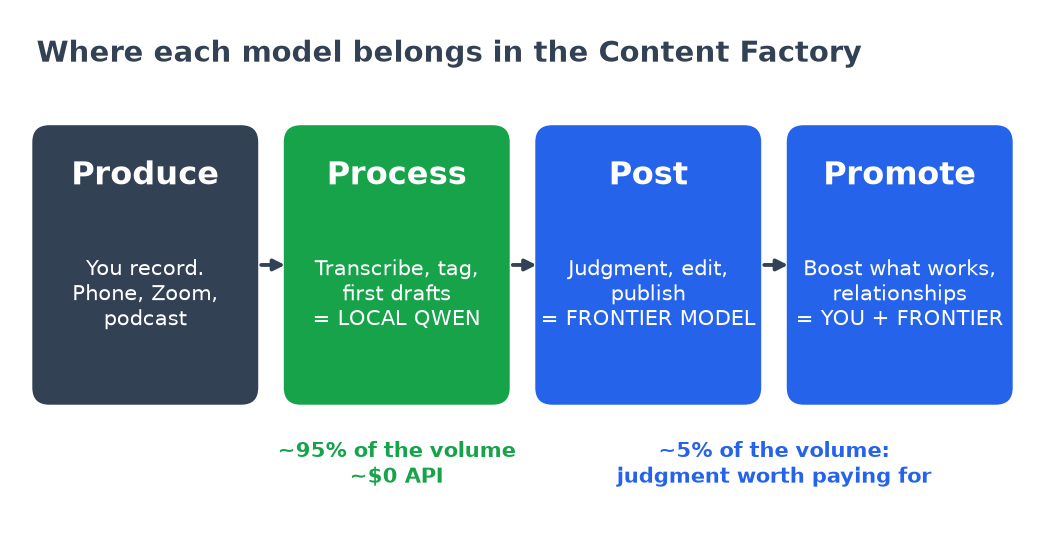
This isn't a "local beats cloud" argument. It's about using the right model at each stage.
Our Content Factory has four stages: Produce, Process, Post, Promote. Process is the grind: transcribing, summarizing, tagging, and first drafts. It's about 95% of the volume and needs almost no judgment. That's Qwen's job.
The last 5% is where I'm happy to pay per token:
- Judgment. Which of the 1,813 drafts deserves to go live? What's actually true? What's missing?
- Publishing. Final voice, links, schema, and QA. A frontier model polished this article.
- Relationships. Anything going to a client, a partner, or a friend. A cheap model never writes those.
Burning frontier tokens on first drafts is like paying a surgeon to take your blood pressure. I learned this the hard way. I've burned 500 million tokens a month on Claude and ChatGPT, and the batch drafts were the easiest place to cut.
Even this article followed that rule. Local Qwen wrote the first draft on my Travel Mac between client jobs. My conductor agent checked the numbers, fixed what Qwen got wrong, made the charts, and published it.
Which Qwen should I run? (And does a new Mac mini beat my old MacBook?)
Right after I published this, I watched Alex Finn run Qwen on a brand-new Mac mini, and my first thought was, "Wait, are my two older laptops behind?" A lot of you will have the same thought. So here's the fifth-grade version first, then the nerd details for anyone who wants them.
Local AI is a brain that lives on your computer
When you run Qwen locally, you're not renting a brain in the cloud. The brain lives on your laptop. Two things decide how good that brain can be:
- Memory (RAM) is the size of the room. A smarter brain is a bigger brain, and it has to fit in the room. If it doesn't fit, nothing else matters.
- Memory bandwidth is the width of the hallway. It's how fast words can walk out of the brain. Wider hallway, faster words.
A newer, faster chip helps. But for local AI, RAM is usually the real gate.
Two shapes of Qwen: the careful writer and the quick talker
Think of two kids writing a book report. One reads the whole book and thinks about every sentence. The other skims and answers fast. Both are useful. You just don't want the skimmer writing your client's article.
- Dense (the careful writer). Uses its whole brain for every word. Slower, and usually better writing. Example: Qwen3.8-27B.
- MoE, or "mixture of experts" (the quick talker). You'll see "A3B" in the name. It's a big brain, but only a small part, about 3 billion parameters, wakes up for each word. It feels zippy and is great for chat and demos. It's often weaker on long marketing drafts. Example: Qwen3.6-35B-A3B.
The version number is the generation: 3.5, then 3.6, then 3.8. Newer generation doesn't mean it's the fast demo model. Look at the shape, not just the number.
| For power users | What I run (production) | Typical Mac mini demo |
|---|---|---|
| Model | mlx-community/Qwen3.8-27B-4bit | Qwen3.6-35B-A3B (as in Alex Finn's Hermes demo) |
| Generation | 3.8 (newer) | 3.6 (older) |
| Shape | Dense: all 27B parameters work on every token | MoE: 35B total, ~3B active per token |
| Size in memory | ~15–16 GB (4-bit) | ~21 GB |
| Feels like | Slower, steadier long drafts | Snappy chat, "wow" demos |
| Best for | Articles, outlines, social packs from real recordings | Interactive agents, coding toys, quick Q&A |
Why I pick quality over speed for marketing
The internet is drowning in AI slop. Generic posts that sound like nobody wrote them. Google, your audience, and your clients can all smell it.
The Content Factory works differently. We're not asking AI to make stuff up. We're repurposing real podcasts, real videos, and real Office Hours into articles and posts. The whole point is that the draft still sounds like the human who said it. So I'll happily wait longer for a careful writer. Words per second is a fun number for a demo. It's the wrong number for a client's reputation.
Does a new Mac mini beat my older MacBook Pro?
Not for this job. A brand-new car with a small trunk can't haul more than an older truck. For local AI, the trunk is RAM and the engine that matters most is bandwidth.
| Machine | Memory (room) | Bandwidth (hallway) | CPU / GPU cores |
|---|---|---|---|
| Mac mini M6 (typical demo box) | 32 GB | ~170 GB/s | 12 / 12 |
| My Travel MacBook Pro, M3 Max | 128 GB | ~400 GB/s | 16 / 40 |
| My Home MacBook Pro, M5 Pro | 64 GB | ~307 GB/s | 18 / 20 |
Specs from my own two Macs and the demo video, checked October 11, 2026.
My "older" M3 Max laptop has four times the room and more than twice the hallway of that Mini. The M5 Pro has twice the room. Once a 21 GB model, the operating system, and the app are loaded, a 32 GB Mini is basically full. My Macs have room left over for longer context, more work at once, or a bigger model later.
The Mini is a great little machine, and the demo is real. Just don't buy new hardware because of a YouTube title. Check RAM and bandwidth first.
My decision guide
- Batch drafts and the Content Factory Process stage: dense Qwen3.8-27B 4-bit on MLX. Pin it, and don't swap models mid-queue.
- Interactive agent demos, chat, coding toys: an MoE like Qwen3.6-35B-A3B is fine, and it's fun. Run it on the side, not in place of your production model.
- Don't restart the model in the middle of a batch. You lose hours of work. Time and consistency beat chasing every new release.
- Thinking about a switch? Run a small bake-off first, about 10 drafts from the same real transcript on both models. Compare which one sounds like the person. Don't compare who finishes first.
For the full setup, read How I Use Local Qwen. For what the batch actually does all day, read how I batch marketing agency work on local Qwen.
How to start
- Use a Mac with real memory. I run Qwen3.8-27B 4-bit on a 128GB and a 64GB MacBook Pro.
- Install it the simple way. Follow How to Install Local Qwen (MLX, No Ollama).
- Put a conductor in charge. Don't babysit the model. How I Use Local Qwen explains who drives it and what breaks.
- Batch it. Start with a backlog you already have, like old podcasts, Zoom calls, or your phone's camera roll. See how I batch marketing agency work on local Qwen.
- Know what you're actually paying for. Subscriptions and API meters bill differently. Four Lunch Tickets explains how Claude, ChatGPT, Grok Bot, and Cursor each bill you.
FAQ
How much does it cost to run Qwen locally instead of using an API?
About $0 in API fees. For my batch of 1,813 items and 706 media hours, electricity across two Macs came to roughly $5 to $15. The real cost is wall-clock time: weeks instead of hours.
What would the same batch cost on GPT-4o or Claude?
Drafting alone: about $195 on GPT-4o, $175 on Claude Sonnet 5, and $260 on Claude Sonnet 4.6. Add Whisper-class transcription and the totals land around $430 to $560. The cheapest cloud options, GPT-4o mini and Gemini 2.5 Flash, still come in around $200 to $290 once transcription is included.
Why is transcription so expensive in the cloud?
It's priced per minute of audio. At Whisper's $0.006 per minute, 706 hours comes to about $250, which is more than the drafting on most models. Local Whisper on a Mac costs nothing beyond power.
Is local Qwen good enough to publish without review?
No, and nothing should be. Qwen does the first draft, the triage, and the tags. A frontier model plus a human handles judgment, fact checks, and the final publish. That split is where the savings come from.
Is this worth it for a small batch?
For ten episodes, probably not. Just pay the API. The math gets compelling once you have hundreds of hours of media sitting in a backlog, which most podcasters, coaches, and agencies do.
Which Qwen model should I use for marketing content?
For long drafts made from real recordings, use a dense model like Qwen3.8-27B (4-bit on MLX). It's slower than MoE models like Qwen3.6-35B-A3B, but the writing usually holds up better and sounds more like the person who recorded it. Use MoE models for chat and demos.
Is a new Mac mini better than an older MacBook Pro for local AI?
Not if the older machine has more memory. A 32 GB Mac mini M6 with ~170 GB/s of bandwidth is basically full once a 21 GB model loads. A 128 GB M3 Max (~400 GB/s) or 64 GB M5 Pro (~307 GB/s) has far more room and moves words faster. RAM and bandwidth matter more than the chip's age.
Where to start
If you want the system, not just the model: The model is the cheap part. The value is the Content Factory around it, turning real expertise into content that gets your clients found. Start here.
If you're young and figuring out what's next: Don't get a job. Get a client. The AI Builder path teaches you to run agents like this for local businesses and get paid for results. Start on the AI Builder path.