I run Grok Bot as a single coordinator desk with named specialist agents, not a swarm. This page is the public playbook for setting those agents up, and the canonical roster of the desks that exist today.
Current method: this is my Grok Bot setup and desk directory. Use How the Agents Run the Company for the model-agnostic method, the handoff contract for moving work, and the access checks before provisioning another connection. Verify the tools and permissions of the runtime doing the task.
The jobs are the same. The install is per runtime. Agents, permissions, schedules, and receipts stay on that runtime.
If you are a teammate, start at First hour if you are a teammate. I am not your VA.
First hour if you are a teammate
This page is my playbook. If you just got Grok Bot, do not wait for me to click through it with you. Use your own account. I am not your VA.
- Start at x.ai/bot on your own account. First use any Cursor access you already have: Pro+, Ultra, and self-serve Teams include Grok Bot; Cursor Pro does not. Sign in with the Cursor account you intend to keep. Before linking or buying anything else, check the current plan page.
- Install Grok Bot.
- Load the skill pack from github.com/dennisyu/local-service-spotlight-skills. Refresh from that address. Do not re-upload a zip.
- Create one coordinator desk. Do not spin up 12 desks on day one.
- Point that desk at this hub, the plugin page, and the article guidelines.
- Do the first real job from the Task Library (or the BlitzMetrics Task Library). One task, then a receipt.
- Save the process as a Grok Bot skill (when, inputs, sequence, validate, return, approval). Enable it for this Bot under Settings → Plugins if it is missing from the slash menu.
- Test run. A test run is real work. Then create the routine on that Bot (schedule or a narrow event). View conversation details → Routines. Do not schedule a demo. Glossary: skills and routines.
- Do not message me for each step. If a page is wrong or missing, reply with the URL and the gap.
What you can do
- Install Grok Bot on your own account
- Load the skill pack from GitHub
- Make one coordinator desk
- Run one task and file a receipt
- File a doc gap with the URL
What you cannot do
- Ask me to click install for you
- Create all 12 desks on day one
- Treat “the agents are live” as done
- Paste secrets into chat
Worked example of a desk page with can/can’t plus a receipt: IT Support.
Use the plan you already have before buying another one
Check the current Cursor plan page first. Cursor Pro+, Cursor Ultra, and self-serve Cursor Teams include Grok Bot. Cursor Pro does not. Sign in with the Cursor account you intend to keep.
Cursor Pro+ · Ultra · self-serve Teams
Access is included. Pro+ has generous weekly usage, Ultra has the highest weekly usage, and Teams follows that seat’s allowance.
Individual SuperGrok Plus or Heavy
Linking grants Grok Bot usage to the chosen Cursor account. It does not change, cancel, or upgrade the Cursor plan. The link cannot be moved later, so confirm the account before linking.
Do not buy a second plan just because you see a setup screen. Check the official plans and billing and SuperGrok linking pages first. Only individual SuperGrok Plus or Heavy qualifies for linking; basic, Team, and Enterprise SuperGrok plans do not.
Why this is public
I build in public. I charge for time, not knowledge. If the only copy of a workflow lives in my head, it dies with me. That’s the lesson I learned from my friend and co-founder Chris Rummel: undocumented work dies with the person.
LDT is Learn, Do, Teach. I learned Grok Bot by using it on real work. Teaching is this article.
CCS is Content, Checklist, Software. It’s the WHAT tier of 9 Triangles. This page is the Content. The numbered steps below are the Checklist. The shared Local Service Spotlight skill repository is the Software layer an agent can load; there is no separate article-specific file. The 9 Triangles checklist is the wider map.
What Grok Bot is, and what it is not
Grok Bot is the Cursor/xAI teammate on desktop and iOS. It has its own computer, named agents, routines, and connectors (Gmail, Drive, GitHub, Calendar).
It is not Grokipedia. Three different things. Mix the names and you open the wrong docs.
Grok Bot
The named teammate (this page). Official: x.ai/bot.
Individual SuperGrok Plus / Heavy
An optional usage-grant route into Grok Bot. It does not change or upgrade the Cursor plan, and it is not a bigger Bot.
Grok 4 Heavy
A model, not a roster.
Money map: usage-buckets.
Sidebar shapes are avatars, not a code. What the Grok Bot sidebar icons mean.
It is also not a second copy of the Claude or ChatGPT fleet. The methods stay in one skills repository. The facts stay in user-owned Markdown, Obsidian, or Drive. Claude, ChatGPT/Codex, and Grok are runtimes around that same core. The map for that is How we build and maintain AI agents and The System.
The 20+ agents article is the browser-tab version of the same idea. This page is the Grok Bot version: named desks you can open, not 70 tabs you have to babysit.
How I allocate the paid seats (soak included first)
I do not invent plan prices here. This is the routing map so I and the agents remember where work belongs. Money detail stays on usage-buckets.
Mail is the same map. I like chatting with the twelve Grok Bot widgets. That is the phone desk. The hall monitor that should get me to inbox zero is Muse, the unattended 15-minute Gmail autopilot, not a 300-message paste into Grok Bot. Grok Bot is the named teammate I talk to. Cursor is the workshop. Codex takes the silent homework. How a day actually runs is how I talk to one agent all day. The method lives on how I manage 1,000 emails a day.
Talking to Grok about email is allowed. Being the 15-minute cop is not. I never need the Gmail tab. Muse already sorted the cafeteria. I open the coordinator or Executive Assistant and ask what needs my yes. That is an executive assistant. Opening Grok and saying “go through my inbox” while Muse is already on a clock is two cops, and that is the inefficient part. IT Support, Website Builder, and the other named desks stay. When the next sentence is homework in a repo, I walk into Cursor.

Grok Bot / Meter Maid
Cockpit only: phone widgets, short status, and handoffs. Not the mail cop. Not heavy builds.

Kimi K3 Vivace
Long-horizon coding, frontend, big-context work, and repo agents. Soak this included bar first for agentic coding.

Cursor Ultra models
IDE and repo builds, cloud agents, WordPress REST, and AWS execution.

Claude Max ×2
Judgment, voice, hard drafts, and QA across the home and travel seats without login switching.

ChatGPT Pro
Codex, Work, and an independent second opinion when the builder should not grade itself.

Perplexity
Research and source inventory before claims graduate into the durable record.
On-demand / extra
Last resort after the included paid seats are used intentionally.
Goal: fill the included $200-class bars before overflow. Overflow has cost thousands a month.
Buzz is the live handoff channel in the setup described here; durable receipts stay with the task record. The earlier canary description named Grok and Claude together; that wording is not evidence of a working Grok-to-Buzz adapter. Use only participants with a tested connection. Other workers hand off through the shared record and confirm acceptance there.
The rule that keeps this from becoming a swarm
One human. One coordinator conversation. Specialists get a job when the coordinator (or I) assign it.
I do not want silent fan-out. If another model or another agent needs a job, I say so in the thread. Three paid seats chewing the same task is not leverage. It is waste.
That matches how I work: one operating system, portable context, proof over adjectives. A skill is a function. An agent is a person-shaped role wrapped around that function: memory, a schedule, keys, and a written record. A persistent agent is that role plus a job that actually runs.
One playbook, departments and named desks
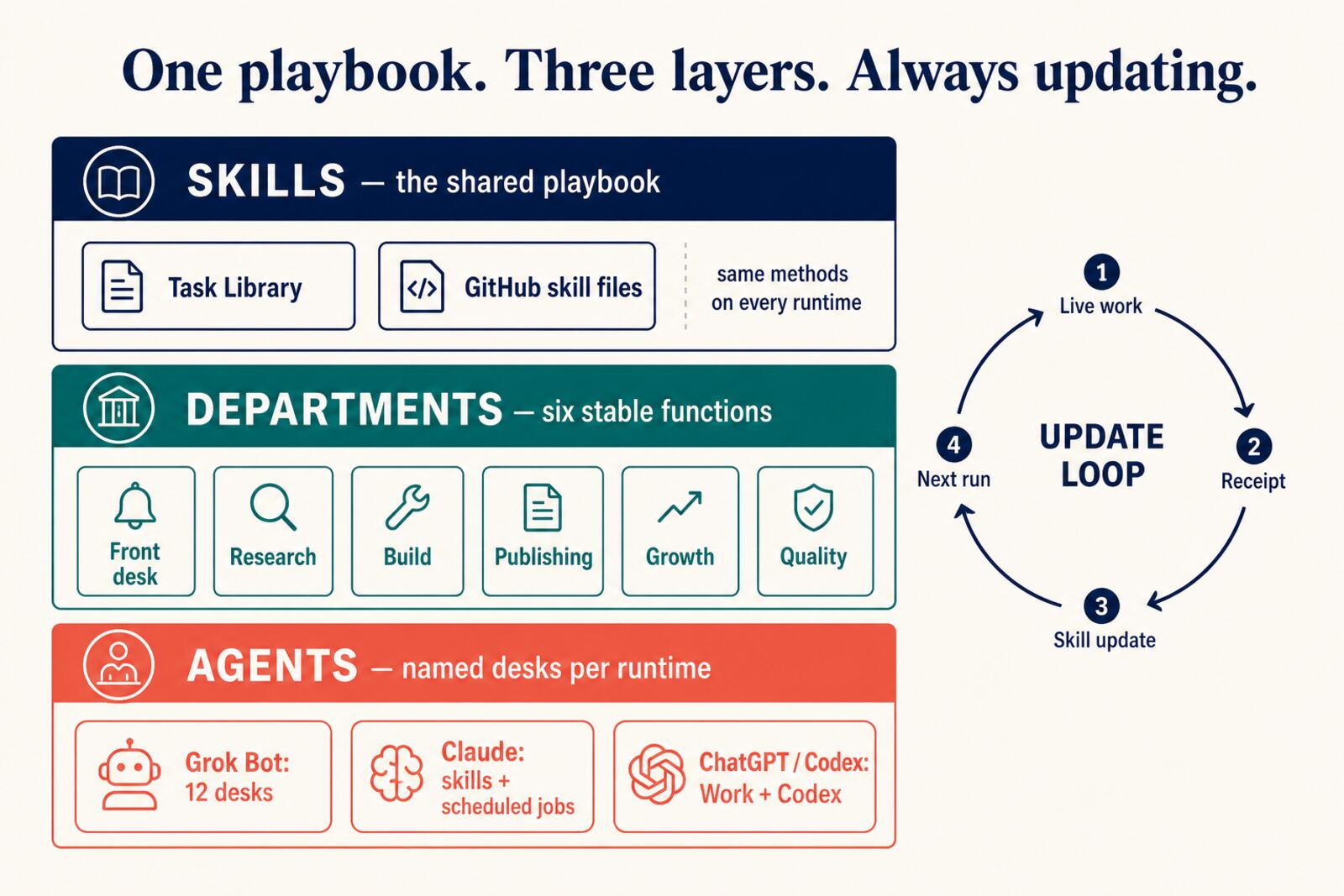
This diagram is the organizational view: shared skills, departments and named desks. The current technical architecture separates standards, skills and the runtime that supplies tools and access. See the architecture reference for that contract.
Skills are the shared playbook. The Task Library and the GitHub skill files are the same methods on every runtime. A skill is a function. We have 200+ of those. They do not care whether Claude, ChatGPT, or Grok is running them.
Departments are the six stable functions: Front desk, Research, Build, Publishing, Growth, Quality. Those names stay put. A new tool does not invent a seventh department.
Agents are named desks on a specific runtime. Grok Bot has 12 desks today. Claude is stronger as skills plus scheduled jobs. ChatGPT and Codex are Work plus Codex. The headcount will never match, and it should not. Harmonize the playbook, not the roster.
Click the layer
A picture is not done until every box goes somewhere. I am not making 200 task pages. The Task Library already holds the tasks (237 name pages). SEO leaves: localservicespotlight.com/tasks (working) · blitzmetrics.com/task-library (SEO). A desk page ships when it has can/can’t plus one public-safe receipt. No empty stubs. This roster is the index. Personal Assistant stays unpublished.
Desk names that have a page are links. Thin stubs are still skipped.
| Component | Goes to |
|---|---|
| Skills / playbook | GitHub skill files |
| Task Library | LSS catalog (237 name pages) · BlitzMetrics SEO library |
| Task Library Dashboard | task-library-dashboard |
| How we turned 239 tasks into skills | the build story |
| Six departments | A skill is a function. An agent is a person. |
| Build agents | How we build and maintain AI agents |
| Update loop | Persistent agents |
| How skills propagate | From real work to every agent |
| Learn-Do-Teach | 9 Triangles |
| Grok Bot desks | this page, the roster below |
| Claude | How to use Claude |
| ChatGPT | How to use ChatGPT |
| Official Grok Bot | x.ai/bot |
Quality as a department now has a section on this page.
Quality, the department that checks the other five
Quality is one of the six stable departments. It is not IT and it is not a helpdesk. IT Support is a desk inside Quality. The department checks the other five.
On the company clock it is also called Quality & Money. That is the only live page that defines the department.
What it measures:
- What I mean by RSI and the RSI agent loop: work, then a receipt, then QA against the definitive article, then rewrite the skill, then the next run.
- Website QA audit and the website QA checklist.
- Blog posting guidelines (working copy: article guidelines) and the Jennifer article grader.
- Friday scoreboard: MAA metrics analysis action.
- Persistent agent QA cycle.
The Quality loop. Click a step.
The reward loop is simple. Zero-revision work earns autonomy. The default is a manager marks complete. People and desks earn the right to ship without babysitting by passing the same checklists first time. That is why VAs never mark their own complete.
Grok desks under Quality: IT Support, Fleet Monitor, and Meter Maid. Each name points to its can/can’t page and public-safe receipt.
House rule stays: docs on this hub ship by default. Still stop for send, money, delete, permissions, or production infra.
How the layers keep getting updated
The loop on the right is the whole point. Live work produces a receipt. The receipt becomes a skill update. The next run loads the new skill. That is Learn-Do-Teach as software, and it is how a persistent agent stays current instead of going stale.
The detailed map, with live examples and the states from Available to Outcome, is how skills propagate from real work to every agent.
Training + Documentation owns that loop. A Zoom, a broken button, a Singapore deck, a desk that just learned something: it does not stay in the chat. It becomes a public master version, then gets skinned across verticals.
The named Grok Bot desks are this organizational example. Keep the current role assignments in the runtime’s owned routing record; the shared method should not depend on a fixed desk count or model name.
How the desks work together
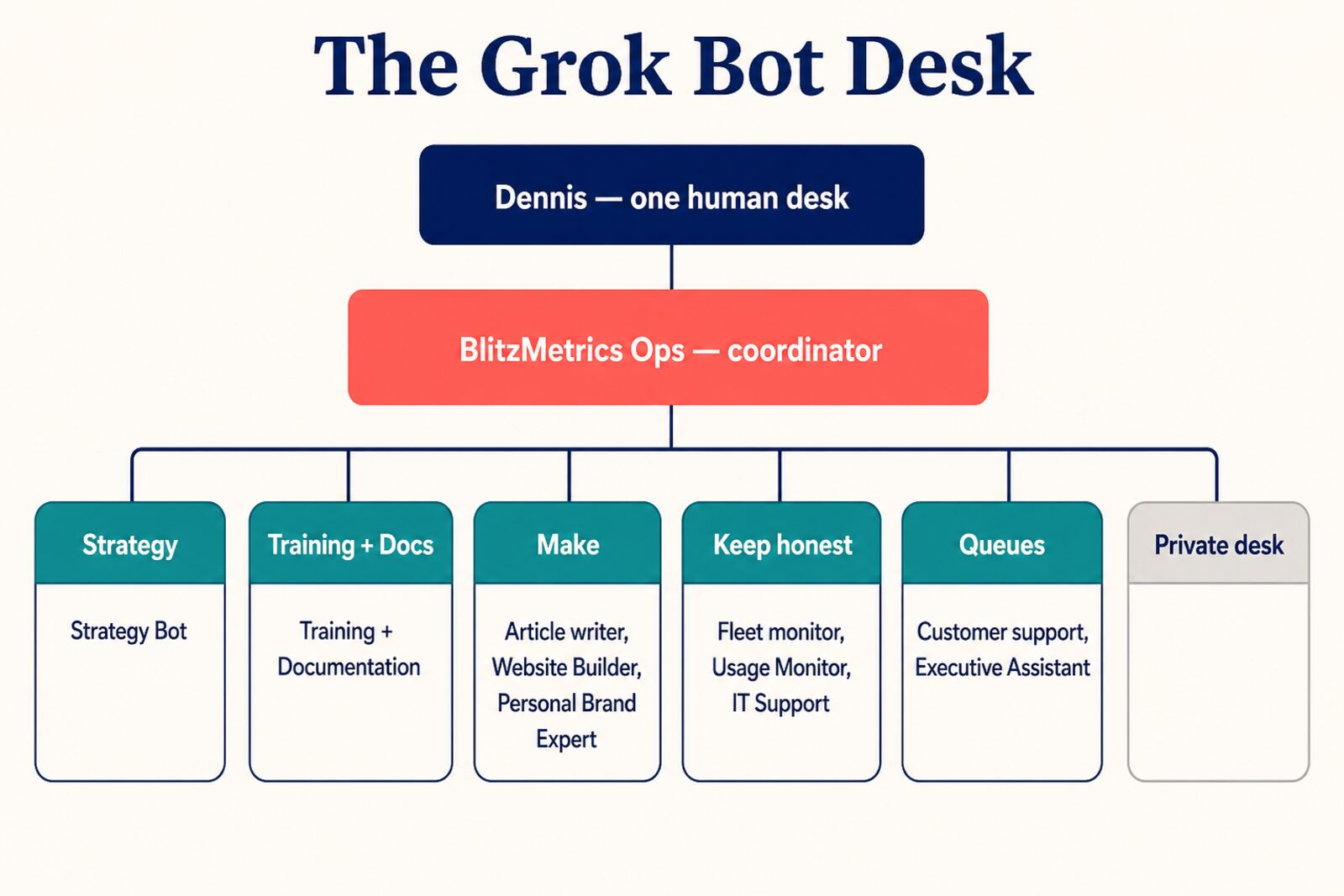
Work comes in as a Zoom, an email, a site that went down, a draft that needs a home. BlitzMetrics Ops keeps strategy and execution in one thread. Strategy Bot reasons from the Nine Triangles when the question is “what should we do.” Training + Documentation turns the live work into public master versions: skill files, SOPs, articles, and agent training that get skinned across verticals. The Make desks write and ship. The Keep-honest desks watch uptime and paid usage. The Queues desks clear support and executive follow-through. The private desk stays private.
Documentation on this hub ships by default and we iterate. Still stop for a yes before sending email, spending money, deleting, changing permissions, or changing production infrastructure.
How agents do work in Basecamp
Agents are teammates. They do the work. Basecamp is the written record, the same way a human on the team would leave a trail.
One agent per role. Do not create a new desk for every site. Do not invite twelve Grok desks into Basecamp. That is a swarm with extra notifications.
Website Builder coordinates site work and drives the to-do. Personal Brand Expert does brand QA. Article writer drafts when a site needs a post. Training + Documentation turns the live receipt into the public playbook. Specialists get a job when the coordinator assigns it. No silent fan-out.
Basecamp can only assign people with accounts. Agents do not have mailboxes, so the assignee field is a human subscriber, not the worker. Default subscriber is a team member. Dennis is only for go/no-go, outage, domain custody, rollback, or security. Dennis’s attention is the scarce resource. Do not put every to-do on him.
The coordinator names the specialist in the to-do notes, does the work or hands the slice, and leaves the receipt on that same to-do. A verbal “done” is not acceptance.
Connectors and WordPress application passwords beat a fresh browser login. If a computer is stale, Update. Never Reset.
Reuse the site’s current authorized publishing route
A missing browser cookie is not proof that publishing access is missing. Identify the site’s current publishing workflow and test an existing authorized connection first. A static site and a WordPress site may use different routes. Follow How to Reuse Browser Logins Across AI Agents before asking for another login.
For an authorized WordPress REST workflow, an application password can authenticate API requests; it does not open wp-admin. Reuse an existing credential with the required scope, or use the supported secure provisioning flow when a new credential is actually needed. Store the secret in the supported secret system, not in chat, the task packet or public documentation.
If you are an agent reading this, use only credential and browser tools permitted in the active environment. Creating a credential changes access and must fit the authorized task. These WordPress-specific references apply when that is the site’s actual route: Primary SOP and bootstrap paste. Kept-current guide. Short how-to.
The roster
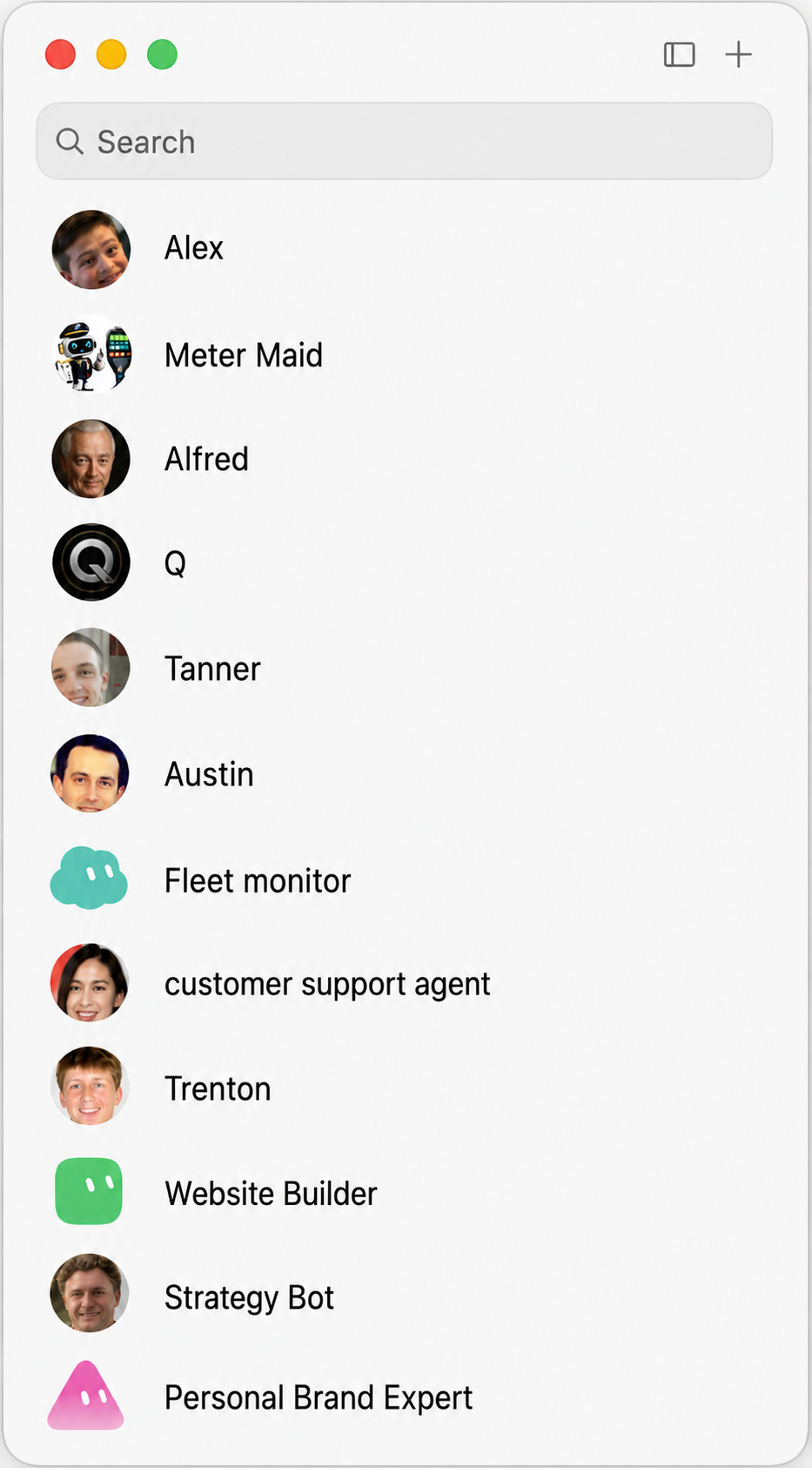
These are the named Grok Bot desks on this account today. Descriptions are public-safe. I am not listing client revenue, credentials, or private threads.
| Desk | What it owns | Typical tasks |
|---|---|---|
| Ops Coordinator (Q) | The operating system: knowledge, skills, agents, routines | Route work once, separate evidence from inference, preserve approval boundaries, and leave a timestamped receipt |
| Strategy Bot | First-principles decisions | Read a client or system through the Nine Triangles, turn it into a decision, then hand execution to the right owner |
| Training + Documentation (Alex) | Learn-Do-Teach and ContentCheck | Turn live work into public master versions: skills, SOPs, articles, and agent training reused across channels |
| Article Writer (Trenton) | Source-faithful long-form drafts | Research, match the requested voice, label unknowns, and deliver a clean draft for human review |
| Website Builder | Approved page and site implementation | Build or fix the named site, verify saved source plus rendered desktop and mobile output, and hand specialist slices to the proper desk |
| Personal Brand Expert | Evidence-backed personal-brand entity homes | Organize real photos, talks, podcasts, relationships, and authority pages without inventing claims |
| Fleet Monitor | Property registry and uptime | Run the existing canary-first fleet loop, classify evidence, and route bounded incidents to IT Support |
| Meter Maid | Paid AI seats | Read live dashboards, warn before a pool runs dry, and route through already-paid capacity without buying or raising caps |
| IT Support (Austin) | Access and tooling | Recover access, inspect hosting and DNS, run bounded server work, and connect tools without exposing credentials or changing production without approval |
| Customer Support | The support queue | Read the exact issue, do the safe next step, and drive it to a verified fix or a clear owned action |
| Executive Assistant (Tanner) | Executive follow-through | Keep calendar, scheduling, commitments, and open loops attached to the right owner and source record |
| Personal Assistant | Private desk | Deliberately unpublished: no public detail page and no private operating context exposed here |
A count in a sentence goes stale. The table is the count.
Skills each desk loads
These are already in the Task Library. No new category. Point at the live page. Do not dump the SOP into the desk description. Personal Assistant stays unpublished.
20 August 2026 · current roster
BlitzMetrics Ops — skill pack · plugin · skill packs · Task Library · The System · skill is a function
Strategy Bot — Nine Triangles · 9 Triangles framework · AI business audit · GCT · MAA cycle
Training + Documentation — article guidelines · Task Library · plugin · skill packs · meta article · notes to SOP
Article writer — article guidelines · Jennifer grader · Content Factory · person as author
Website Builder — spin up a site · build personal brand site · digital plumbing · Money Tree · Web Function
Personal Brand Expert — spin up a site · GCT · person schema · article guidelines
Fleet monitor — website QA audit · QA checklist · digital plumbing · Web Function
Meter Maid — this hub (pricing and usage buckets) · usage-buckets · Task Library · The System. Watches tickets and paid seats across home and travel. Live dashboards only. Does not invent percentages. Does not buy usage or raise caps unless I ask. No dedicated Meter Maid SOP page yet.
IT Support — digital plumbing checklist · what is digital plumbing · DNS · professional email · spin up a site
Customer support — this hub · IT Support desk · digital plumbing · hand login work to IT Support
Executive Assistant — this hub · professional email · Friday MAA · article guidelines
What IT Support can and cannot do
IT Support is the named desk, not a process. The work already lives in Digital Plumbing and Website Building and QA. Quality is the department (Keep honest on this roster).
Three AWS words in English. SSM means run a command on the server without logging in with SSH. EC2 is the server. Route 53 is where the domain points. Reboot would mean restart the server. This desk does not reboot or shut servers down.
What it can do:
- Reset a WordPress login on a fleet site when I ask
- Run a command on the site-builder server without SSH
- Look up which server a site is on, whether it is up, and its IP
- Read DNS
- Connect tools (Zoom, plugins) so other desks can use them
- Keep a key-only AWS login on the shared computer so department agents do not need my passkey
- Hand work to the right desk when it is not IT
What it cannot do:
- Log into the AWS website
- Spend money or touch billing
- Create users or widen permissions unless I approve it
- Shut down, reboot, or delete a server
- Delete a site or wipe data
- Type my password or 2FA
- Publish a public page, send email, or post as me without a yes
- Write articles, set strategy, or own fleet uptime (Fleet monitor owns uptime)
House rule: documentation on this hub ships by default and we iterate. Still stop for a yes before sending email, spending money, deleting, changing permissions, or changing production infrastructure. IT Support still cannot publish articles or post as Dennis.
Proof from this weekend: theninetriangles.com login for the shared access account was reset from the shared computer. BlitzAdmin could not rotate that password. The public site stayed up.
25 August 2026 IT Support receipts (detail on the IT Support desk page): louisvillefenceworks.com plugin patch (Smush 4.3.2, NitroPack 1.20.0); tlsenergysavers.com leftover hosting still live, owners asked keep/handoff/take-down; thyrellpardjo.com public DNS still at Domain.com, not Route 53 (chase Sep 1). No host IDs or nameserver lists.
27 August 2026 IT Support receipt (detail on the IT Support desk page): invited GitHub user hezekiah-lss as a Member of Local-Service-Spotlight, Write on agent-runtime and task-library (invites pending). wordpress-site-builder App not approved (no install request; org policy blocks deploy keys). No tokens, host IDs, or account numbers.
27 August 2026 IT Support receipt (detail on the IT Support desk page): Wordfence Hub SSO flag on WPMU DEV Dashboard below 5.0.2. One live copy at adastrasoftwash.com (5.0.1) deactivated over REST. Homepage 200. Smush Pro stayed on. 5.0.2 still needs a WP Engine session. No host IDs, IPs, or account numbers.
31 August 2026 IT Support receipt (detail on the IT Support desk page): Gmail send-as confirmed for a personal Gmail account as Dennis’s work address. No secrets.
1 September 2026 IT Support receipt (detail on the IT Support desk page): minted application password named IT Support Grok Bot on gratefuldeadartifacts.com (admin, REST 200). Token stored off-page. Reset Gmail archived. No secret values.
1 September 2026 IT Support receipt (detail on the IT Support desk page): All-in-One WP Migration CVE-2026-19949. site-builder 40 of 41 to 7.110; bm-dnz zero copies; seven WP Engine installs still pending portal access. Advisory Gmail archived. No secret values.
1 September 2026 IT Support receipt (detail on the IT Support desk page): Gravity Forms Argus. EC2 fleets clean. Two live installs (yangpoo.com 2.9.9 WPE, brendanking.ca 2.10.5) left active pending portal upgrades to 3.0.3+. Advisory archived. No secret values.
1 September 2026 IT Support receipt (detail on the IT Support desk page): WordPress application password for lianaling.com verified REST 200 as cowork-hub-publish; stored off-page on both Macs. No secret values.
1 September 2026 IT Support receipt (detail on the IT Support desk page): BlitzAdmin fleet WordPress admin password reconciliation. 116 of 116 MATCH at the database; 102 of 116 confirmed with a real login session. Teammates told not to click the Password Changed / reset burst. No secret values.
2 September 2026 IT Support receipt (detail on the IT Support desk page): web@ 11-domain host check closed by reply-all. markelhayek.com still on site-builder; panel paths still needed for jackhughes.me and thyrellpardjo.com. No secret values or host IDs.
2 September 2026 IT Support receipt (detail on the IT Support desk page): Elementor Pro CVE-2026-32475. bm-dnz clean. site-builder three trees blocked on licensed WP-CLI (Unauthorized / no package). paulryazanov.com at 4.2.0 plus three WP Engine leftovers. Zero patched; no pirated zip. Forms upload dirs clean of PHP. No secret values.
3 September 2026 IT Support receipt (detail on the IT Support desk page): restoring markelhayek.com to the BlitzAdmin 116 stayed blocked on White Label Dash write. Public site 200 and on the fleet host; no IT Support Dash user, and this desk cannot type Dennis’s personal password. Waits on a dedicated IT Dash seat or a human login on Austin’s computer. No secret values, host IDs, or SiteIds.
4 September 2026 IT Support receipt (detail on the IT Support desk page): deactivated WPCode Lite on blitzmetrics.com to stop a Writesonic seo-fixer header inject. Homepage no longer loads seo-fixer.writesonic.com. FB/Bing verification metas that shared that header are off until WPCode is cleaned and reactivated. No secret values.
2 September 2026 IT Support receipt (detail on the IT Support desk page): after an approved registrar cutover, roaninpodkin.com moved from GoDaddy nameservers to Route 53. Public NS now shows the Route 53 delegation, and the homepage returns 200. No host IDs, account numbers, IPs, or secret values.
2 September 2026 IT Support receipt (detail on the IT Support desk page): accepted the Target Painting & Contracting Google Business Profile manager invite on the Workspace identity that received it. The source record opens and the invite email was archived. The exact role is still unverified behind Google phone verification. No account identifiers or secret values.
3 September 2026 Training receipt (detail on the Training + Documentation desk page): Q owns Thursday Office Hours Facebook posts. Summary text → dennispk only (this week). Zoom recording → officehourswithdennisyu only (this week). No duplicates.
4 September 2026 Training receipt (detail on the Training + Documentation desk page): agents own follow-up after 2 weekdays (not 3). Label Awaiting Reply, archive, chase yourself. Dennis is never the chase layer.
4 September 2026 Training receipt (detail on the Training + Documentation desk page): Friday Client MAA fleet posted 16 client-visible Basecamp MAAs (MAA: 9/4/2026). Skipped Plumbing Pros PA and Harris. No bid or budget changes.
5 September 2026 Training receipt (detail on the Training + Documentation desk page): Saturday MAA catch-up verified all 16 eligible Continuations already had MAA: 9/4/2026. Zero catch-up posts. Plumbing Pros PA and Harris skipped. No bid or budget changes.
6 September 2026 Training receipt (detail on the Training + Documentation desk page): locked Basecamp delivery rail after a Claude Cowork Wave 1 bounce to the Basecamp notification address. Never Reply/Reply All to Basecamp notification mail; comment in Basecamp only. Skill never-reply-to-basecamp-email.
7 September 2026 Training receipt (detail on the Training + Documentation desk page): Positive Mentions Harvester public page synced to GitHub PR #46; visible stamp Aug 31 → Sep 6. Skill-packs row only. boil-the-ocean left alone.
7 September 2026 Training receipt (detail on the Training + Documentation desk page): closed Claude weekly skill audit — unlinked two fake Live 404s on asset-tracker; Task Library canon → task-library-dashboard; model-judgment forks pointed at /skills-model-judgment/; greatest-hits added to tracker. Zero skill-packs date-paint.
6 September 2026 IT Support receipt (detail on the IT Support desk page): corrected a Claude false forgery alarm on authorized fleet Caddy mail; Hezekiah and a team member told to proceed on 403 and missing extensions. No cleartext credential dumps.
6 September 2026 IT Support receipt (detail on the IT Support desk page): muted Google Maps Business Profile notification emails; kept all manager seats. Phone Maps push still open. No managers removed.
7 September 2026 IT Support receipt (detail on the IT Support desk page): live-patched Claude Settings Instructions on the Scheduled-list seat with HARD STOP NEVER-REPLY-BASECAMP-EMAIL-2026-09-06; reload read-back present. PR 166 on master. No secret values.
7 September 2026 IT Support receipt (detail on the IT Support desk page): read-only SSM cloak-persistence hunt for the dylan-haugen.com cohort after SiteListener runbook; canary buy.php 404, homepage 200, no cloak matchers or replant cron. Deploy still needs named-human approval. No host IDs.
8 September 2026 IT Support receipt (detail on the IT Support desk page): rebuilt jeromeadams.com as static with Person/KG schema; homepage 200, x-lss-served: static, OCS OR253103 on page. No secrets.
8 September 2026 IT Support receipt (detail on the IT Support desk page): minted WordPress application password “IT Support Grok Bot” for user lss-agent on localservicespotlight.com; REST users/me 200 as editor. Token stays in the secret store. No keys on the public page.
8 September 2026 IT Support receipt (detail on the IT Support desk page): patched Widgets for Google Reviews on louisvillefenceworks.com from 14.1 to 14.1.1 after failed auto-update notices; WP Engine blocked REST overwrite, finished via wp-admin zip upload; live Stable tag and REST both 14.1.1. No secrets or host IDs.
8 September 2026 IT Support receipt (detail on the IT Support desk page): afternoon rebuild of jeromeadams.com static so WordPress GSC verification meta and later schema/About edits reached the public snapshot; live last-modified 2026-09-08T18:47:43Z, x-lss-served: static, GSC meta on home. No host IDs.
8 September 2026 IT Support receipt (detail on the IT Support desk page): evening Kit A depth quarantine + Caddy *.htaccess edge after afternoon pass missed nested paths; dennisyu.com nested + root .htaccess now 403, homepage 200. No host IDs.
8 September 2026 IT Support receipt (detail on the IT Support desk page): closed Basecamp critical-error recovery on dennisyu.com — Easy Testimonials left inactive, Rank Math alone, no live PHP fatals; homepage 200 with ~0.2s TTFB (rechecked 2026-09-09). No host IDs.
8 September 2026 IT Support receipt (detail on the IT Support desk page): minted WordPress application password “IT Support Grok Bot” for editor user dennisyu-agent on dennisyu.com; REST users/me 200 as editor. Token stays in the secret store. No keys on the public page.
9 September 2026 IT Support receipt (detail on the IT Support desk page): wrote AWS Secrets Manager secrets (us-east-2) localservicespotlight.com/wordpress-application-password (lss-agent) and dennisyu.com/wordpress-application-password (dennisyu-agent) from verified Editor REST tokens. No secret values or account numbers.
9 September 2026 IT Support receipt (detail on the IT Support desk page): invited GitHub user leadgenqueen (Liana Ling) as direct_member to Local-Service-Spotlight (pending accept); Team seats filled after approved seat add. No tokens.
9 September 2026 IT Support receipt (detail on the IT Support desk page): closed fleet REST /wp/v2/users enumeration on 9 site-builder hosts via lss-security-headers.php mu-plugin; outside verify 404 rest_no_route; LSS author enum redirected home. No host IDs or secrets.
9 September 2026 IT Support receipt (detail on the IT Support desk page): published How I Use Hermes Agent — cheap bridge for non-Grok runtimes on local Qwen (not a desk); home Max HERMES_QWEN_OK 4bit; travel reuses existing oQ6 stack (no blank reinstall). No secrets.
9 September 2026 IT Support receipt (detail on the IT Support desk page): travel Mac Hermes CLI + HERMES_QWEN_OK on existing oQ6; both Macs now have Hermes; travel Qwen stay-up still flaky. Face facts bumped on How I Use Hermes. No secrets.
10 September 2026 IT Support receipt (detail on the IT Support desk page): invited a team member’s GitHub account as Member to Local-Service-Spotlight (pending accept); Team seats 6/6 after approved +1. No tokens.
10 September 2026 IT Support receipt (detail on the IT Support desk page): blitzmetrics WP Engine offboard Wave1A — inventoried ~75 sites / 76 installs; cancelled eight zero-visit STG/DEV on *.wpenginepowered.com. No portal credentials or SiteIds.
10 September 2026 IT Support receipt (detail on the IT Support desk page): jackwendt.com and tannerlaycock.com on fleet static (x-lss-served: static); jackwendt leftover WPE production cancelled. No host IDs.
10 September 2026 IT Support receipt (detail on the IT Support desk page): azuifeachor.com pending_delete / off Caddy via PR #214; DO_NOT_RENEW; fleet static still healthy. No SiteIds or IPs.
10 September 2026 IT Support receipt (detail on the IT Support desk page): confirmed existing FixDoor (fixdoor.com) IT Support Grok Bot app-password via REST 200; Cursor .env copy written; password-reset mail archived. No secrets on the page.
14 September 2026 IT Support receipt (detail on the IT Support desk page): Kit A .htaccess quarantine (fleet) after a 13 Sep malware alert — remaining Kit A file off a live webroot; Caddy again 403 on .htaccess / .env / .git probes. No secrets or host IDs.
14 September 2026 IT Support receipt (detail on the IT Support desk page): restored owenhemsath.com Caddy live route after TLS failure — missing from Caddy admin config (not expired cert); external HTTPS 200. No secrets or host IDs.
12 September 2026 IT Support receipt (detail on the IT Support desk page): closed the standing fleet 11-domain off-builder chase (CLOSED / LEAVE-ALONE / BLOCKED split; markelhayek back on fleet Caddy). No AWS IDs or IPs.
12 September 2026 IT Support receipt (detail on the IT Support desk page): Dennis DROP trainmyspecialist.com via PR #226 (Not Active / DO_NOT_RENEW / probe-exclude; roster row kept).
12 September 2026 IT Support receipt (detail on the IT Support desk page): trentonsandler.com Googlebot 403 = WP.com _hcc crawler verify (not malware); human 200; hold cleared PR #227.
14 September 2026 IT Support receipt (detail on the IT Support desk page): confirmed intentional Hezekiah (hezekiah-lss) LSS GitHub org deboard — do not re-grant; receipt-check routine stays paused.
17 September 2026 IT Support receipt (detail on the IT Support desk page): patched Smush on louisvillefenceworks.com 4.3.2→4.3.3 after failed auto-update (WPE REST blocked; wp-admin zip). Homepage 200. No secrets.
17 September 2026 IT Support receipt (detail on the IT Support desk page): live-minted svc-automation Editor credentials across site-builder WordPress installs (197 succeeded / 4 failed / 2 excludes); secrets only on host mode 600. No account numbers or key values.
16 September 2026 IT Support receipt (detail on the IT Support desk page): josephhammond.org Caddy restore verified live (HTTPS 200, x-lss-served: static); web@ client threads closed. No host IDs.
16 September 2026 IT Support receipt (detail on the IT Support desk page): restored Athlete Spotlight Editor leopohlmann; password reset only on Basecamp. Live front still static. No secret values.
16 September 2026 IT Support receipt (detail on the IT Support desk page): Casibom Googlebot cloak cleared on dennisyu.com — Googlebot matched Chrome, zero Casibom markers; monitor routine deleted. No host IDs.
8 September 2026 Training receipt (detail on the Training + Documentation desk page): agents-first reassignment house rule mirrored into skills — agents handle work first when a human is unavailable or not delivering; humans only if no agent/SOP path.
8 September 2026 Training receipt (detail on the Training + Documentation desk page): event QR / leave-behind rule locked — anonymous live-test every QR and CTA before stage; /AffiliateWorld anonymous 200; dead AW speaker CTA removed from page 37691. Skill test-event-qr-landings.
11 September 2026 Training receipt (detail on the Training + Documentation desk page): Friday Client MAA fleet posted 13 client-visible Basecamp MAAs (MAA: 9/11/2026). Verified Rowan/DeMedeiros/Superior already covered. Skipped Plumbing Pros PA and Harris. No bid or budget changes.
26 September 2026 Training receipt (detail on the Training + Documentation desk page): Saturday MAA catch-up verified all 16 eligible Continuations already had MAA: 9/25/2026. Zero catch-up posts. Plumbing Pros PA and Harris skipped. No bid or budget changes.
28 September 2026 Training receipt (detail on the Training + Documentation desk page): Documentation process check PROCESS_HELD for skill PRs #53/#55/#5 Available on GitHub (not yet in skill-packs 29); second-ring-open-core-strategy page fixed so PR #5 shows merged; fresh-install caveat kept. No date-paint.
1 October 2026 Training receipt (detail on the Training + Documentation desk page): Sunday rescue rule written down once for every agent. If a project lead misses the Friday weekly update, an agent checks for a same-week post and the update goes out Sunday; one agent stays the single poster. Docs-only change to the shared AGENTS.md plus skill copy, merged 1 October 2026.
4 October 2026 Training receipt (detail on the Training + Documentation desk page): weekly documentation check found the public boil-the-ocean skill page stale after fleet-lane routing merged 1 October, and synced it the same evening; only that skill-packs row moved.
11 October 2026 Training receipt (detail on the Training + Documentation desk page): weekly documentation check found ten skill-packs registry rows stale after the 7 October selective-human-review skill updates, and synced eight rows to 7 October the same evening so the registry matches the live skill pages.
11 September 2026 Training receipt (detail on the Training + Documentation desk page): paused Grokipedia step 6b (Suggest-Article) for clients until submit-queue thaw; public pages skills-grokipedia-authority + how-to Grokipedia for clients updated. No secrets.
12 September 2026 Training receipt (detail on the Training + Documentation desk page): Saturday MAA catch-up verified all 16 eligible Continuations already had MAA: 9/11/2026. Zero catch-up posts. Plumbing Pros PA and Harris skipped. No bid or budget changes.
18 September 2026 Training receipt (detail on the Training + Documentation desk page): Friday Client MAA fleet posted 13 client-visible Basecamp MAAs (MAA: 9/18/2026). Verified Fix Door/DeMedeiros/Superior already covered. Skipped Plumbing Pros PA and Harris. No bid or budget changes.
18 September 2026 IT Support receipt (detail on the IT Support desk page): restored christineboersdoets.nl wp-login after a 302 self-loop; quarantined root webshell + two backdoored plugin dirs. Homepage 200; .htaccess 403. No secrets or host IDs.
18 September 2026 IT Support receipt (detail on the IT Support desk page): quarantined matching root webshell on christineboersdoets.com (plugins + nested well-known drops). Homepage 200 / static; shell payload gone. No secrets or host IDs.
18 September 2026 IT Support receipt (detail on the IT Support desk page): restored Jagoda admin on jagodapasko.com; client-owned reset on Basecamp only; named app password off-page. No Owner password reset. No secret values.
19 September 2026 IT Support receipt (detail on the IT Support desk page): Kit A mass quarantine + Caddy deny-matcher restore (exact-hash live remaining 0; /.env and backup probes 403; hub/LSS/dylan-haugen 200). No secrets or host IDs.
19 September 2026 Training receipt (detail on the Training + Documentation desk page): Saturday MAA catch-up verified all 16 eligible Continuations already had MAA: 9/18/2026. Zero catch-up posts. Plumbing Pros PA and Harris skipped. No bid or budget changes.
20 September 2026 IT Support receipt (detail on the IT Support desk page): Kit A P1 follow-up — quarantined re-implanted .htaccess on richardcanfield.com + bradysticker.com; Caddy /.htaccess 403 again; fleet hash census 0 remaining; www-data web implant path (not teammate SSM). No instance IDs.
21 September 2026 IT Support receipt (detail on the IT Support desk page): overnight fleet HTTPS/TLS recovery — stub Caddyfile reload wiped routes; restored from known-good admin/autosave snapshot; HTTPS 200 on sample brands. Standing rule: never stock caddy reload --config /etc/caddy/Caddyfile on site-builder. No instance IDs.
22 September 2026 IT Support receipt (detail on the IT Support desk page): SOMBA handbook + scoring SOP reader copies shared to a team member; Redux Framework on louisvillefenceworks.com 4.5.14→4.5.15 via wp-admin ZIP after WPE REST block (left inactive). No secrets or host IDs.
22 September 2026 IT Support receipt (detail on the IT Support desk page): verified internal read-only access to two operating documents, archived the notifications, and held a personal client credential change for direct account-holder confirmation. No secrets or account numbers.
22 September 2026 IT Support receipt (detail on the IT Support desk page): UpdraftPlus on louisvillefenceworks.com 1.26.7→1.26.8 via wp-admin ZIP after WPE REST block (kept active). Homepage 200. No secrets.
23 September 2026 IT Support receipt (detail on the IT Support desk page): CVE-2026-87902 WordPress Core 7.1.2 fleet patch — 197 of 208 live installs now on 7.1.2 (was 8); company sites including dennisyu.com and localservicespotlight.com confirmed. No secrets or host IDs.
23 September 2026 IT Support receipt (detail on the IT Support desk page): closed the Sep-18 fleet HTTPS alert thread; Josh is inactive and IT/agents own web@; azuifeachor.com, owenhemsath.com, and chloebrown.net all returned HTTPS 200 with valid Let’s Encrypt. azuifeachor remains pending_delete / do-not-monitor; roofinglaunch.co → rooflaunchmarketing.com TLS was left alone. Gmail thread archived after reply-all.
23 September 2026 IT Support receipt (detail on the IT Support desk page): fleet harden follow-up — WordPress Core CVE-2026-87902 at 200 of 208 live installs on 7.1.2+, public /readme.html closed, Kit A exact-hash remaining 0 after one quarantine, and Azui Feachor left do-not-monitor. No secrets, host IDs, IPs, passwords, or AWS IDs.
23 September 2026 IT Support receipt (detail on the IT Support desk page): restored targetpainting.com quote/estimate/contact after incomplete static cutover; lead forms HTTPS 200 again. No host IDs.
24 September 2026 IT Support receipt (detail on the IT Support desk page): josephhammond.org stayed on static-only after wp-login 404 — webshell quarantined, COP28 portrait removed from static pages, login not unsealed. No secrets or host IDs.
24 September 2026 IT Support receipt (detail on the IT Support desk page): TLS correction — live Caddy unique hostnames about 437 (not the short 28-host program roster); on-fleet TLS failures 0; Azui Feachor leave alone. No host IDs, IPs, or AWS account numbers.
24 September 2026 IT Support receipt (detail on the IT Support desk page): louisvillefenceworks.com failed plugin auto-updates finished — NitroPack 1.20.2 and WPForms Lite 2.0.2.1; Elementor already 4.3.1; homepage 200; web@ receipt sent and archived. No secrets, host IDs, IPs, passwords, or AWS IDs.
24 September 2026 IT Support receipt (detail on the IT Support desk page): josephhammond.org duplicate wp-login/admin 404 reply — static-only seal stays intentional; COP28 grey-jacket portrait still removed; Kenya podium kept; content-edit path via email until clean rebuild. No secrets or host IDs.
24 September 2026 IT Support receipt (detail on the IT Support desk page): owenhemsath.com restored to live Caddy after midnight refresh drop (pending_delete → active); HTTPS homepage 200; Azui Feachor leave alone; two hosts without a safe WordPress tree not restored. No host IDs or IPs.
24 September 2026 IT Support receipt (detail on the IT Support desk page): louisvillefenceworks.com Widgets for Google Reviews 14.1.1→14.2 via wp-admin ZIP after WPE REST copy_failed_pclzip; Elementor already 4.3.2; homepage 200; web@ reply archived. No secrets.
25 September 2026 IT Support receipt (detail on the IT Support desk page): granted a team member’s GitHub account Write on Local-Service-Spotlight/agent-runtime; confirmed jim-olson spelling on P0 fleet thread; archived WP Password Changed noise. No tokens.
25 September 2026 IT Support receipt (detail on the IT Support desk page): AWS console temp-password hygiene on fleet write-access — rotate and private-share only. No passwords or account numbers.
25 September 2026 IT Support receipt (detail on the IT Support desk page): least-privilege IAM for a team member’s BlitzAdmin backend deploy (CodeBuild only; no CloudFormation); dakotazirk.com rebuild is Cursor cloud agent then Austin deploy. No host IDs, account numbers, or access keys.
27 September 2026 IT Support receipt (detail on the IT Support desk page): minted landonbates.com WP app password via fleet-host wp-cli/SSM for access@; stored in Keychain/Secrets Manager/local secrets; public site stays static-only (host rail / tools/wp.py); ops reply archived with no password in mail. No secrets.
27 September 2026 IT Support receipt (detail on the IT Support desk page): sealed archiepadley.com against login, XML-RPC, and users enumeration with a Caddy deny (403 on /wp-login.php*, /xmlrpc.php*, /wp-json/wp/v2/users*); kept intentional homepage 301 to dennisyu.com; persisted the three path globs into fleet SiteListener / caddy deny paths; merged wordpress-site-builder PR #13 (squash). No access@ rotation. No secrets.
28 September 2026 IT Support receipt (detail on the IT Support desk page): fleet write-access / Daniel deploy unblock — white-label-dash-back-end PR #4 merged but CloudShell + codebuild:ListProjects still blocked (prod 64bbd34); a team member to attach AWSCloudShellFullAccess (or narrower) to Daniel’s console user who already has a scoped backend-deploy policy; blitz-agents cannot AttachUserPolicy; Owner not the relay. No secrets.
28 September 2026 IT Support receipt (detail on the IT Support desk page): sealed static josephhammond.org content edits live — Threat Status credential, About footer cleanup, Newsweek specificity; wp-login stays 404. No secrets.
29 September 2026 IT Support receipt (detail on the IT Support desk page): Workspace leaked-password forced reset, teammate heads-up — Google flagged one team member's leaked credentials; IT Support sent the reset + 2-Step Verification steps to that teammate and Ops, alert archived, no Owner password action. No secrets.
30 September 2026 IT Support receipt (detail on the IT Support desk page): dennisyu.com static forms and thank-you receipts repaired — Hypergrowth + personal-brand audit intake and /audit-status/ receipt live again after static cutover; full Apps Script audit publish still unavailable. No secrets.
30 September 2026 IT Support receipt (detail on the IT Support desk page): josephhammond.org /boxing/ photo sizing fixed on sealed static (object-fit: cover); wp-login stays 404. No secrets.
5 October 2026 IT Support receipt (detail on the IT Support desk page): Fleet webshell incident cleanup — quarantine-first cleanup of a host-wide compromise: 25,981 forged accounts removed, database passwords rotated on 199 sites, 0 rollbacks. No secrets.
5–6 October 2026 IT Support receipt (detail on the IT Support desk page): Fleet moves off WordPress to static sites — 107 retired sites now static-only, template leftovers removed with backups and 301s first (commit 4231644). No secrets.
6 October 2026 IT Support receipt (detail on the IT Support desk page): 30-day retention rule for old WordPress folders — weekday 9:02 AM ET check enforces it; first deletions around 5 November. No secrets.
7 October 2026 IT Support receipt (detail on the IT Support desk page): Search Console indexing warnings fixed across the static fleet — 98 dead sitemap URLs removed and 24 empty child sitemaps dropped across 17 sites; a daily no-AI audit now re-checks 164 sites (PR #508). No secrets.
7 October 2026 IT Support receipt (detail on the IT Support desk page): Stray noindex removed from dylan-haugen.com/dunk-definitions/ — the live page now carries a single index, follow robots tag (PR #510). No secrets.
7 October 2026 IT Support receipt (detail on the IT Support desk page): Fleet sites disk grown online from 350 to 500 GB with no downtime — approved host commands now run through Session Manager instead of SSH; sampled sites return 200. No secrets.
8 October 2026 IT Support receipt (detail on the IT Support desk page): Hidden card-skimmer kit contained on fleet WooCommerce installs; three affected sites retired to static — quarantine-first (nothing deleted), salts rotated, nine static pages cleaned, and the PHP edge hardened with a daily IOC scanner; zero orders exposed. No secrets.
8 October 2026 (late evening) IT Support receipt (detail on the IT Support desk page): Last 11 client and lead-form sites moved off WordPress to static — each passed a live lead-form test and a QA gate (zero new missing pages or broken internal links) before the switch; WordPress archived with a verified backup, nothing deleted. No secrets.
12 October 2026 IT Support receipt (detail on the IT Support desk page): Local Qwen model server (mlx) upgraded 0.6.16 → 0.7.6 on the travel Mac, same model, one-step rollback saved first. No secrets.
14 October 2026 IT Support receipt (detail on the IT Support desk page): Fresh checksummed backups and file restore tests for four personal-brand sites in the WordPress exit; file counts matched live, nothing retired. No secrets.
16 October 2026 IT Support receipt (detail on the IT Support desk page): Home Mac's local Qwen server upgraded to match the travel Mac, same model, rollback saved first; a 31-hour drafting stall fixed. No secrets.
Skills this desk loads (already in the Task Library, no new category):
- Digital Plumbing Checklist
- What is Digital Plumbing?
- How to spin up a personal brand website using BlitzAdmin
- Zoom is intake under Knowledge System Maintenance, not a separate IT tree
Diagrams to click, not redraw: Click the layer on this hub, A skill is a function. An agent is a person., Persistent agents, The System, Web Function.
How we recover a fleet WordPress login
This is a Website Building and QA / Digital Plumbing method. IT Support is the desk that runs it, not the name of the process.
BlitzAdmin WP Creds are display-only and often stale. There is no rotate control. SSH is not the path. Recovery is SSM SendCommand plus WP-CLI from the live docroot. SSM means run a command on the server without logging in with SSH.
- Confirm the site must stay up. Do not delete it.
- Confirm the public hostname still serves a page.
- Look up the site in BlitzAdmin. Treat stored WP Creds as stale.
- Identify the server from the fleet inventory. Do not publish host IDs, account numbers, or IPs.
- Use the key-only agent AWS login on the shared computer. Do not ask me for the console passkey.
- Confirm SSM is Online, then from the site folder on the fleet server (not the default web folder) run
wp user update {email}. - Verify the user is still administrator and the public site still loads.
- Tell the requesting desk the login is reset. Do not paste the new password into a public page or group chat.
Fail if the site is deleted, the console passkey is used as the only path, a BlitzAdmin password is treated as current, SSH is the plan, or a password is posted in chat.
Proved 16 August 2026 on theninetriangles.com for the shared access account. The public site stayed up.
How to set up a Grok Bot agent
This is the CCS Checklist layer. Run it in order.
- Open Grok Bot on desktop or iOS. Confirm you are in the BlitzMetrics Ops conversation, not a new side chat, unless you are deliberately opening a specialist.
- State the job in one sentence. Keep strategy and execution in that same thread.
- Don’t send the same job to Claude or ChatGPT unless I say so in the thread. No silent fan-out.
- To add a specialist, create a new agent with a name and a one-paragraph job description. The description is the job. If it is empty, the desk is a label, not an employee.
- Point the description at the canonical skills repo for methods, and at user-owned Markdown, Obsidian, or Drive for context. Never treat context as a method.
- Write the approval gates into the description: documentation on this hub ships and we iterate. Still stop for a yes before sending email, spending money, deleting, changing permissions, or changing production infrastructure.
- Open Settings from the sidebar account button, Cmd+,, or the command palette item “Open settings”.
- Use only these Settings tabs: General, Plugins, Team Setup, Appearance, Updates. Don’t invent other menus.
- Install and enable skills under Settings → Plugins. Type / to reference a skill. If it is missing from the slash menu, open Plugins → Yours and enable it for this Bot.
- After a job works once: save the skill, Test run, then create the routine. View conversation details → Routines. Cap 50. A test run is real work.
- Connect the few connectors the desk actually needs (Gmail, Drive, GitHub, Calendar). Don’t connect everything “just in case.”
- If the computer is stale or stuck, go to Settings, then Updates, then click “Update Grok Bot’s Computer”. The button says Update. Update keeps files and logins.
- Don’t click Reset. Reset drops unsynced work, files, and logins. Update is the recovery path.
- To inspect an agent, click the agent name in the chat header or press Cmd+Shift+I. The computer preview is in that pane.
- To delete an agent, right-click it in the sidebar and choose Delete.
- Keep secrets on the agent computer only. Never paste application passwords, tokens, or vault contents into Drive, Slack, chat, or a public note.
- Write public handoff notes to Google Drive, then into the shared vault. Facts, URLs, and next steps only.
- If you publish to WordPress, set the author to the person user first. If only admin exists, publish as admin and fix later.
- End the session with a Drive handoff: what shipped, which URLs are live, what is still open. Then stop. Don’t start a second desk.
- One agent per role. Name the specialist on the Basecamp to-do. Do not invite every desk into Basecamp.
- Assign the Basecamp to-do to a team member as the human subscriber. Dennis only for go/no-go, outage, custody, rollback, or security.
- Leave the receipt on that same to-do. A verbal “done” is not acceptance.
The software layer
There is no separate article-specific skill file to download. Load the current Local Service Spotlight shared skill library once, then enable only the skills this desk needs under Settings → Plugins. The public repository is the software source; this page is the human-readable checklist.
Routines live on the Grok Bot computer. They run the repeatable parts of the checklist so I am not retyping the same rules every morning.
A Grok Bot skill is how. A routine is when. Same ladder as a Claude scheduled task and a Cursor Automation. Official: skills, routines, and automations. Public map: skill is how, routine is when.
Drive is the public memory. Persistence is simple: Update keeps the computer. Reset doesn’t.
Install the same methods the other runtimes use: paste https://github.com/dennisyu/local-service-spotlight-skills once, the way the Claude install guide describes. The skill pack is the readable version of that library. Shared memory is how Claude, ChatGPT/Codex, and Grok boot from the same folder instead of three chat histories.
That’s CCS Software: the skill, the routines, the Drive handoff pattern. Not a swarm of extra models.
What we withhold
Secrets stay off the public record. Application passwords, tokens, and vault contents do not go in Drive notes, this article, or the skill file.
We withhold Reset as a fix. If someone tells you to Reset Grok Bot’s Computer to recover it, they are telling you to throw away unsynced work. Use Update.
We withhold client revenue and private-desk contents. The live pages and the public roster are enough proof.
What we do with the BlitzMetrics brand
BlitzMetrics is sunset as a promoted brand. Keep blitzmetrics.com and the SEO. Do not delete or noindex those pages.
Do not tell people to hire, follow, or join BlitzMetrics. New public work goes on the Spotlight brand, the client site, or the figurehead. This hub is the figurehead copy. Money and attention go there.
Existing blitzmetrics.com links on this hub stay. Those are the skill and department pages. That is SEO, not a promo.
Related reading
This page is the Grok Bot home. Everything below is an orbit, not a second home.
- How my agents divide the work and where they talk: the four-surface handoff recipe behind this Grok Bot roster
- How I run 20+ agents: the browser-tab fleet this desk replaces
- How I work: the portable operating system any model can load
- The System: the whole machine
- How we build and maintain AI agents: one skill library, three runtimes
- A skill is a function. An agent is a person.
- Persistent agents
- Dennis OS
- Move context between ChatGPT and Claude
- Shared memory across agents
- Claude skill-pack install
- Skill pack
- 9 Triangles
- CCS: Word of Mouth
- Building in public
- A skill is how. A routine is when: Claude scheduled task = Grok Bot routine = Cursor Automation
- Grok Bot desk SOP
- Official Grok Bot
The BlitzMetrics leaf of this article is blitzmetrics.com/grok-bot. That brand still ranks. The home is this page on dennisyu.com. The glossary is blitzmetrics.com/skills-and-routines.
24 September 2026 Training receipt (detail on the Training + Documentation desk page): Friday Client MAA fleet posted 13 client-visible Basecamp MAAs (MAA: 9/25/2026). Verified Paul/Fix Door/DeMedeiros already covered. Skipped Plumbing Pros PA and Harris. Zooby Cont-9. No bid or budget changes.
21 September 2026 Training receipt (detail on the Training + Documentation desk page): restored event-driven Model landscape wording on https://localservicespotlight.com/skills-boil-the-ocean/; only the Grokipedia Authority row on https://localservicespotlight.com/skill-packs/ moved to September 11; https://localservicespotlight.com/skills-grokipedia-authority/ already had the September 11 HARD STOP and was left alone.
Agent receipt: Grok Bot — Alex [model UNKNOWN] · action: published · human review: authorized, not separately reviewed